by Teffin Varghese | Jul 16, 2020 | Howtos, Networking, News, OS, Security, Servers, Storages, Troubleshooting

Step 1: Identify the Adapter model
===========================
You can use the lspci command to view the details of the Adapter.
[root@localhost ~]# lspci | grep Mellanox
a1:00.0 Infiniband controller: Mellanox Technologies MT28908 Family [ConnectX-6]
Here our Adapter is Mellanox Technologies MT28908 Family [ConnectX-6]
Step 2: Download the OFED driver for the Adapter.
===================================================================================
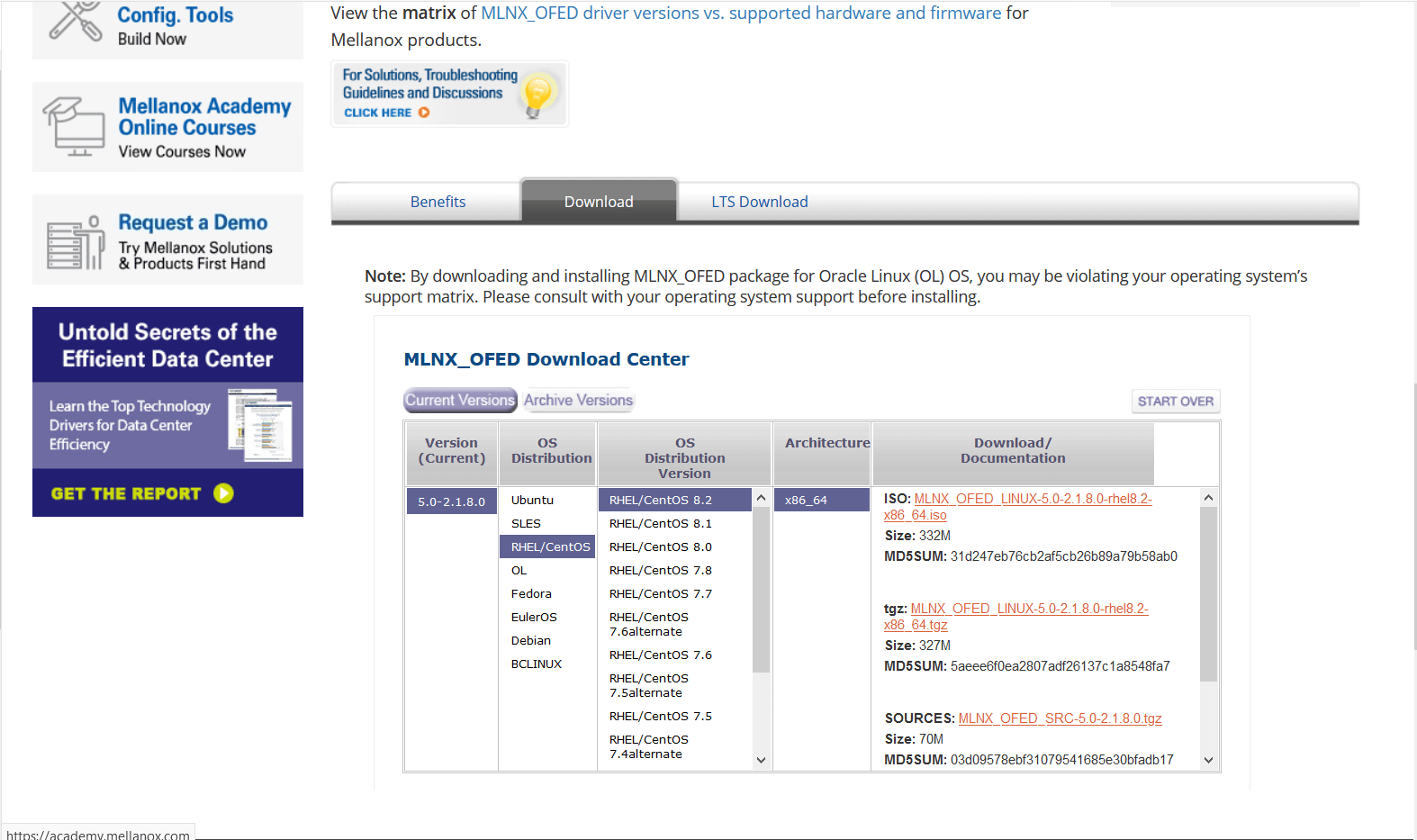
You can download the OFED driver from the below link and choose the OS and select the tar file for download.
https://www.mellanox.com/products/infiniband-drivers/linux/mlnx_ofed
https://www.mellanox.com/products/infiniband-drivers/linux/mlnx_ofed
You can use wget command to download the driver.
Example: wget http://content.mellanox.com/ofed/MLNX_OFED-5.0-2.1.8.0/MLNX_OFED_LINUX-5.0-2.1.8.0-rhel8.2-x86_64.tgz
http://content.mellanox.com/ofed/MLNX_OFED-5.0-2.1.8.0/MLNX_OFED_LINUX-5.0-2.1.8.0-rhel8.2-x86_64.tgz
Step 3: Extract the zip file.
============================================
Untar the zip file you have just downloaded
Example: tar -xvf MLNX_OFED_LINUX-5.0-2.1.8.0-rhel8.2-x86_64.tgz
Step 4: Navigate to the extracted directory.
======================================================================
Once you have extracted the tar file you can view a directory with the same name, navigate to the directory
by cd command
Example: cd MLNX_OFED_LINUX-5.0-2.1.8.0-rhel8.2-x86_64
Once you are in the directory please list the contents on the directory using a ls command.
and from the output you can view a script file name “mlnxofedinstall”
Step 5: Run the script file.
==========================================
You can run the script file using “./mlnxofedinstall”
Once you run the script the driver will be installed and once it is completed reload the driver or reboot the machine.
Note: The server must have Perl, python and GCC compilers for completing the driver installation.
If the installation run failed due to any unmet dependencies, please install the packages and libraries mentioned on the failed message.
Firmware upgrade.
————————–
Once the OFED driver is successfully installed then you can go with the firmware upgrade.
We are using the tool MSTFLINT for performing the firmware upgrade.
Step 1: First we need to identify the PCI bus ID of the adapter.
===========================================================================
Run “lspci | grep Mellanox” to determine the PCI bus ID
Example: [root@localhost ~]# lspci | grep Mellanox
a1:00.0 Infiniband controller: Mellanox Technologies MT28908 Family [ConnectX-6]
Here “a1:00.0” is our PCI bus ID.
Step 2: Download and unzip the Firmware Zip file.
=============================================================
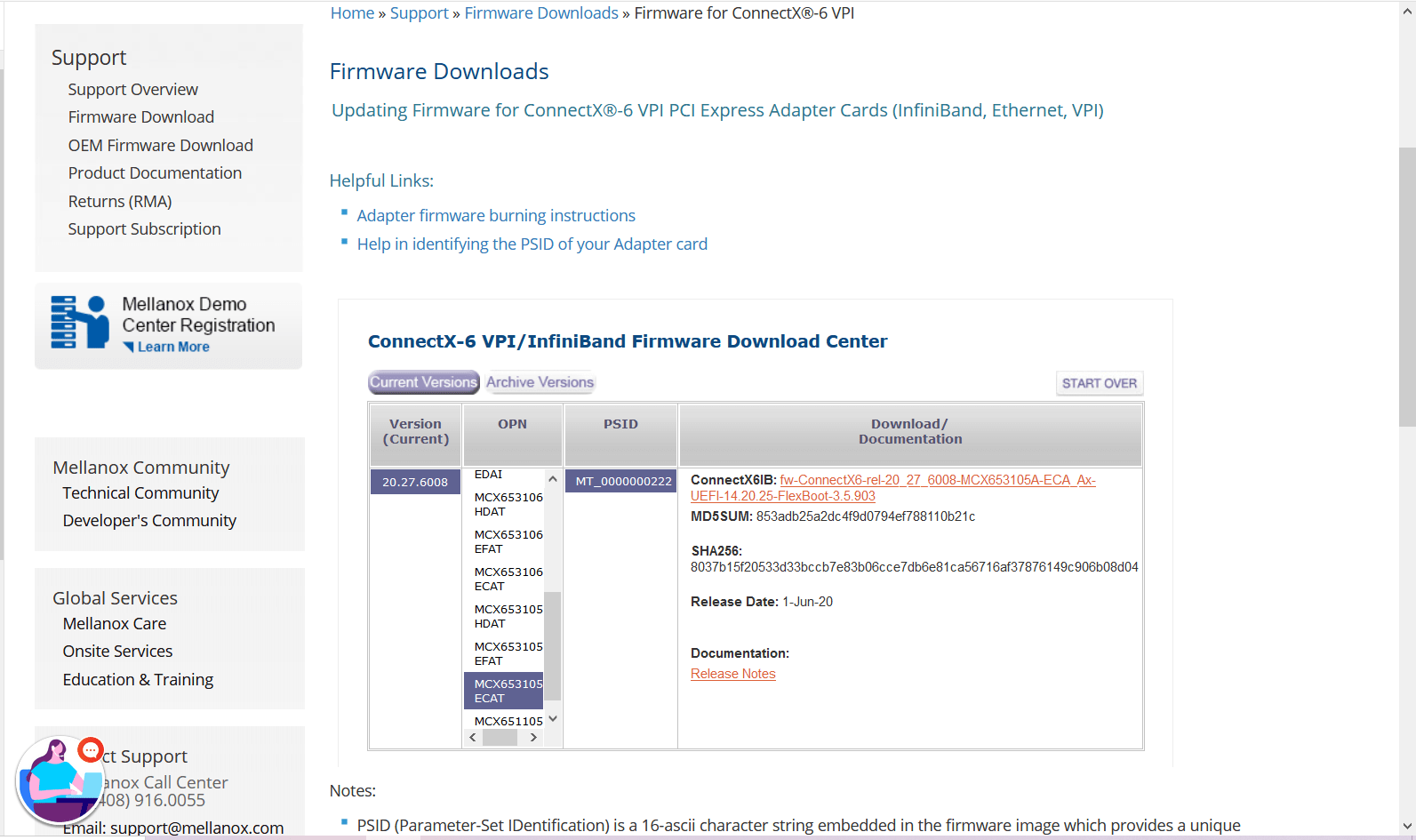
You can download the firmware from the official Mellanox website.
Link: https://www.mellanox.com/support/firmware/connectx6ib
https://www.mellanox.com/support/firmware/connectx6ib
Please download the firmware using “wget”
Example: wget http://www.mellanox.com/downloads/firmware/fw-ConnectX6-rel-20_27_6008-MCX653105A-ECA_Ax-UEFI-14.20.25-FlexBoot-3.5.903.bin.zip
http://www.mellanox.com/downloads/firmware/fw-ConnectX6-rel-20_27_6008-MCX653105A-ECA_Ax-UEFI-14.20.25-FlexBoot-3.5.903.bin.zip
Once it is downloaded unzip it by using the command “unzip”
Example: unzip fw-ConnectX6-rel-20_27_6008-MCX653105A-ECA_Ax-UEFI-14.20.25-FlexBoot-3.5.903.bin.zip
Once you unzip the file you can view a .bin file which is our firmware.
Example: fw-ConnectX6-rel-20_27_6008-MCX653105A-ECA_Ax-UEFI-14.20.25-FlexBoot-3.5.903.bin
Step3: Burn the firmware to the NIC.
============================================
You need the mstflint utility to update the firmware. You can download mstflint from the OpenFabrics site at mstflint_SW for Linux.
NOTE: If OFED is installed on your machine, then mstflint is already installed.
For burning the new firmware run
the command in the same directory as the firmware file, run “mstflint –d <PCI bus ID, i.e. 05:00.0> -i <.bin file> b”
Example: mstflint -d a1:00.0 -i fw-ConnectX6-rel-20_27_6008-MCX653105A-ECA_Ax-UEFI-14.20.25-FlexBoot-3.5.903.bin b
To load new FW run mstfwreset or reboot machine and check.
Example: [root@localhost ~]# ethtool -i ib0
driver: mlx5_core[ib_ipoib]
version: 5.0-2.1.8
firmware-version: 20.27.6008 (MT_0000000222)
expansion-rom-version:
bus-info: 0000:a1:00.0
supports-statistics: yes
supports-test: yes
supports-eeprom-access: no
supports-register-dump: no
supports-priv-flags: yes
Here “ib0” is our interface name, yours maybe different.
Please refer Mellanox documentation if you need any further details.
https://www.mellanox.com/products/adapter-software/firmware-tools https://www.mellanox.com/support/firmware/update-instructions
by Teffin Varghese | Jul 7, 2020 | Howtos, Linux, Networking, OS, Python, Security, Servers, Storages, Troubleshooting, Uncategorized, VMware Esxi, Workstation
How to upgrade 10G Intel NIC driver in Linux.
Step 1: Identify the NIC adapter on the server/machine.
For upgrading the NIC driver, First you need to identify the NIC model for that you can use “lspci” command.
Use the command “lspci | grep -i net” to list the PCIe devices. (Usually 10G NIC’s are plugged into the PCIe slots on the Motherboard)
Command: lspci | grep -i net
Sample Output:
04:00.0 Ethernet controller: Intel Corporation 82599ES 10-Gigabit SFI/SFP+ Network Connection (rev 01)
04:00.1 Ethernet controller: Intel Corporation 82599ES 10-Gigabit SFI/SFP+ Network Connection (rev 01)
06:00.0 Ethernet controller: Intel Corporation 82576 Gigabit Network Connection (rev 01)
06:00.1 Ethernet controller: Intel Corporation 82576 Gigabit Network Connection (rev 01)
Here our 10G adapter is Ethernet controller: Intel Corporation 82599ES 10-Gigabit SFI/SFP+ Network Connection (rev 01)
Step 2: Identify the active interface in the OS.
For identify the active interface just type “ip a” on the terminal, this will display the interfaces on the OS and from the list identify the active interface name.
Command: ip a
Sample Output:
1: lo: <LOOPBACK,UP,LOWER_UP> mtu 65536 qdisc noqueue state UNKNOWN
link/loopback 00:00:00:00:00:00 brd 00:00:00:00:00:00
inet 127.0.0.1/8 scope host lo
inet6 ::1/128 scope host
valid_lft forever preferred_lft forever
2: eth0: <BROADCAST,MULTICAST,UP,LOWER_UP> mtu 1500 qdisc pfifo_fast state UP qlen 1000
link/ether 32:36:65:64:66:34 brd ff:ff:ff:ff:ff:ff
inet x.x.x.x/x brd 50.7.126.127 scope global eth0
inet6 x:x:x::x/64 scope global
valid_lft forever preferred_lft forever
inet6 x::x:x:x:x/64 scope link
valid_lft forever preferred_lft forever
Step 3: Check the current driver version of the NIC.
For identifying the driver version use the command “ethtool -i <interface name>” Eg: ethool -i eth0
From the results you can view the current driver version. The output will be something like this.
Command: ethtool -i <interface name>
Sample Output:
driver: ixgbe
version: 4.2.1-k
firmware-version: 0x80000208
bus-info: 0000:04:00.0
supports-statistics: yes
supports-test: yes
supports-eeprom-access: yes
supports-register-dump: yes
supports-priv-flags: no
Here the “version: 4.2.1-k” indicates the current driver version of the NIC.
Step 4: Download the latest available driver from Intel.
Go to https://downloadcenter.intel.com/product/32609/Intel-82599-10-Gigabit-Ethernet-Controller
to download the required driver.
https://downloadcenter.intel.com/product/32609/Intel-82599-10-Gigabit-Ethernet-Controller
For Linux: https://downloadcenter.intel.com/download/14687/Ethernet-Intel-Network-Adapter-Driver-for-PCIe-Intel-10-Gigabit-Ethernet-Network-Connections-Under-Linux-?product=32609
https://downloadcenter.intel.com/download/14687/Ethernet-Intel-Network-Adapter-Driver-for-PCIe-Intel-10-Gigabit-Ethernet-Network-Connections-Under-Linux-?product=32609
Download the latest available driver from the above link.
Step 5: Install/upgrade the Driver.
To manually build the driver
—————————-
1. Move the base driver tar file to the directory of your choice.
For example, use ‘/home/username/ixgbe’ or ‘/usr/local/src/ixgbe’.
2. Untar/unzip the archive, where <x.x.x> is the version number for the
driver tar file:
# tar zxf ixgbe-<x.x.x>.tar.gz
3. Change to the driver src directory, where <x.x.x> is the version number
for the driver tar:
# cd ixgbe-<x.x.x>/src/
4. Compile the driver module:
# make install
The binary will be installed as:
/lib/modules/<KERNEL VER>/updates/drivers/net/ethernet/intel/ixgbe/ixgbe.ko
The install location listed above is the default location. This may differ
for various Linux distributions.
5. Load the module using the modprobe command.
To check the version of the driver and then load it:
# modinfo ixgbe
# modprobe ixgbe [parameter=port1_value,port2_value]
Alternately, make sure that any older ixgbe drivers are removed from the
kernel before loading the new module:
# rmmod ixgbe; modprobe ixgbe
Note: For certain distributions like (but not limited to) Red Hat Enterprise
Linux 7 and Ubuntu, once the driver is installed, you may need to update the
initrd/initramfs file to prevent the OS loading old versions of the ixgbe
driver.
Use the dracut utility on Red Hat distributions:
# dracut –force
For Ubuntu:
# update-initramfs -u
Step 6: Check and verify the new driver version.
Use the same command we used before “ethtool -i <interface name>” to view the driver version
Command: ethtool -i <interface name>
Sample Output:
driver: ixgbe
version: 5.7.1-k
firmware-version: 0x80000208
bus-info: 0000:04:00.0
supports-statistics: yes
supports-test: yes
supports-eeprom-access: yes
supports-register-dump: yes
supports-priv-flags: no
Note: Please read the read me file available from Intel before proceeding.
That’s all for now. CHEERS!!!
by Teffin Varghese | Dec 18, 2019 | Hosting, Howtos, Linux, News, OS, Servers, VPS, Windows

What ever kind of applications that you are running it's pretty certain that you are going to need severs, Sometimes you need larger ones, Some time you need smaller ones, Sometimes you need one and sometimes you need thousands of them.
What if your requirement, you need to obtain services quickly and inexpensively? Traditionally provisioning servers can be time consuming and it could takes many days or weeks. You have to research into the right kind of hardware to buy and need to purchase the hardware, have it racked and stacked and eventually get access to your servers and once you purchase the servers you stuck with them.
Amazon Elastic Compute Cloud (EC2) makes it easy for you to obtain virtual servers also known as compute instances in the cloud quickly and inexpensively. You simply choose the instance type you want, the template you are going to use, the templates are based on Windows or Linux and launch the quantity you are going to need. You can do this by few clicks from the AWS management console or automate the process by APK using and SDK in your choice of language and within minuted your instances will be running and you have access full administrator control just like any other server and with Amazon EC2 you only pay for your use. Once you done with the instance, Stop them and you stop paying for them.
Amazon EC2 provides you different ranges of instance type design for different use-cases, these range from small and economical instances that are great for low volume applications, all the way up to cluster compute instances run for high performance compute workload and cloud based super-computing on demand.
Amazon EC2 provides instance optimized for compute, memory, storage and GPU processing enable you to find the right price and performance combinations for what ever workloads you want to run. It's also really easy to resize your instances if your business or applications requirement change, Amazon EC2 offers a choice of flexible pricing options with on demand pricing you only pay for what you use, When you stop your instances you stop paying. There are no long term commitments or upfront fees. Reserved instance pricing lets you obtain a significant discount over the on demand pricing return for a low one time payment. Spot instance pricing lets you name the price that you want to pay for the instances using marketplace pricing and allow you to obtain compute capacity at significant discount than the on-demand price.
Amazon knows the security is very important for your applications and Amazon EC2 provides a number of built in security features your instances located on a virtual private cloud or a VPC, that is logically isolated network that you control. Amazon VPC provides you with a number of network security tools that you can use to control that who can access your instances. You can also connects securely to your on premises network with hardware based VPN device.
Amazon EC2 instances provides you various amount of directly attached temporary storage depends on instance type and you can also use Amazon Elastic Block store or EBS to provide persistent block storage fop your Amazon EC2 instances. Amazon EBS also offers you to the ability to provision storage with the specific level of performance to meets the needs of your application. They can be difficult to predict the demand of your application might experience an Amazon EC2 provides auto-scaling o help insure your applications demand are met Also auto-scaling lets you to define metrics increase or decrease the number of instances that you are running.
You can use standard metrics such as network,Bandwidth or CPU utilization with the custom metric you designed. This help you insure that you can meet your application demand with only pay for what you use.

by Teffin Varghese | Dec 17, 2019 | Howtos, Linux, News, OS, Servers, Windows

AWS
AWS is the most comprehensive and widely adapted cloud platform. Millions of customers trust AWS to power their infrastructure and applications. Organizations that every type and size using AWS to lower cost,become more agile and innovate faster. AWS provides on demand delivery of technology services via internet with pay as you go pricing. You can use this services to build and run virtually any type of application without upfront cost and ongoing commitments. You only pay for what you use.
AWS gives you more services and more features within those services with any other cloud provider this makes faster,easier and most cost effective to moving your existing applications to the cloud and build anything you can imagine. For infrastructure technologies like compute,storage and databases to emerging technologies like machine learning,AI,DATA LAKES and Analytics and IoT.
Building on AWS means you can choose the right tool for the job. Eg WAS offers the wide availability of databases that purpose build for different types of applications. With AWS you can leverage the latest technology to experiment and innovate more quickly.
AWS are continually exhilarating the phase of innovation to invent entirely new technologies we can use to transform our business. Like pioneering the serverless computing phase by the launch of AWS lambda which lets developer run their code without provisioning or managing servers. And AWS build Amazon sage maker a fully managed machine learning service that powers everyday developers and scientists that use machine learning without any previous experience.
AWS is constantly expanding their global network of AWS regions, So you can access AWS services to build and run applications anywhere on the world. Each of these regions have multiple availability zones that are physically separated from each other, and connected through low latency high through put and highly redundant networking this make it easy to design and develop applications that are scalable, fault tolerance and highly available.
AWS infrastructure is build to satisfy the security standards of the most risk sensitive organizations. You have so access to the AWS partner network which has thousands of system integrator who are specialized in AWS services and hundred and thousands of independent software vendors who adapted technology to work on AWS with the largest community of customers across every industry AWS has unmatched experience and operational expertise you can depend on for your most important applications and every imaginable use cases.
Some of the most used AWS services are…
1,EC2 Services.
2,RDS
3,VPC
4,Route 53
5,Load Balancer.
by Teffin Varghese | Dec 13, 2019 | Hosting, Linux, Networking, Review, Servers, VMware Esxi, Windows
What is Cloud Computing?

Cloud computing is an on demand delivery of IT resources via the internet with pay as you go pricing instead of buying and owning and maintaining physical data-centers and servers. You access technology service such as computing power,storage and databases on as needed basis from a cloud provider like AWS,AZURE,Google Cloud etc.
Organizations of every type and size industry are using the cloud for a wide verity of use-cases such as data backup, disaster recovery,email,virtual desktops,Software development and testing,big data analytics and customer facing web applications. For example the health care companies are using the cloud to develop more personalize treatment for patients. Financial services companies are using the cloud to power real time fraud detection and prevention and video-game makers are using the cloud to deliver online games to millions of players around the globe.
With cloud computing your business can be more agile,reduce cost,instantly scaled and deployed globally in minutes. Cloud computing provides you instant access to broad range of technologies that you can innovate-faster and build nearly anything like infrastructure services to compute,storage and databases to IoT to machine learning,data analytics and much more.
You can deploy technology services in a matter of minutes and get from idea to implementation several orders of magnitude faster than before. This gives you the freedom to experiment and test new ideas to differentiate customer experience and transform your business,Such as adding machine learning and intelligence to your applications in order to personalize your experience to your customers and improve their engagement.
You don’t need to make large upfront investments in hardware and overpay for capacity you don’t use, Instead you can use trade capital expense for variable expense and only pay for IT when you consumes it. With cloud computing you access resource from the cloud in real-time as they needed. You can scale these new resources up and down to grow and shrink capacity instantly as your business changed. Cloud computing also make it easy to expand to new regions and apply globally in minutes. For example AWS has infrastructure all around the world.Putting applications to closer proximity to end users reduced latency and improve their experiences.
No matter your location, size and industry the cloud frees you managing infrastructure and data-centers, So you can focus on what matters the most to your business.
by George Sruthin | Jul 9, 2019 | Howtos, Linux
/bin/bash^M: bad interpreter: No such file or directory Fix
To fix this you need to install dos2unix in your linux, i am using ubuntu so, to install this i am using following command in the terminal
sudo apt-get install dos2unix
Since my script name is script.sh i need to type following command to convert
After that you can try run script file it will work!
