by George Sruthin | Apr 2, 2019 | Howtos, VMware Esxi
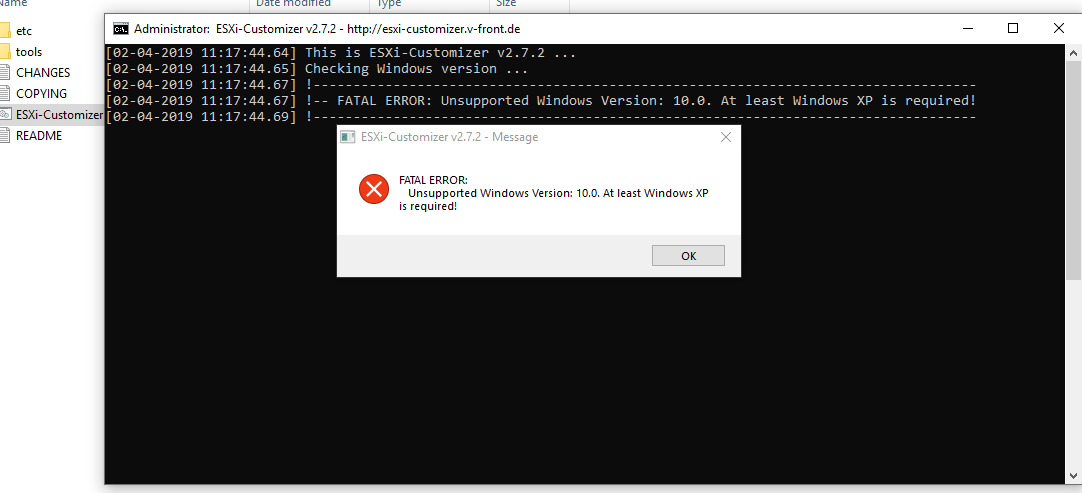
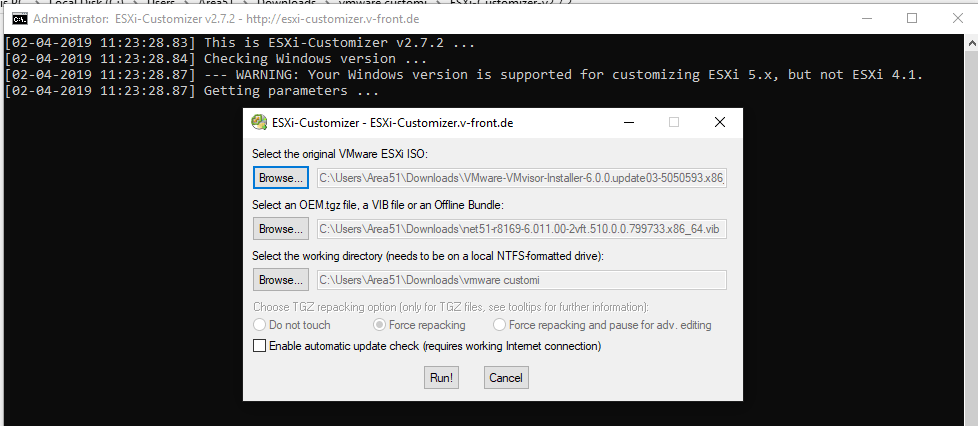
You may face this issue when running ESXi-Customizer in Windows 10, to fix this you need to follow this instruction.
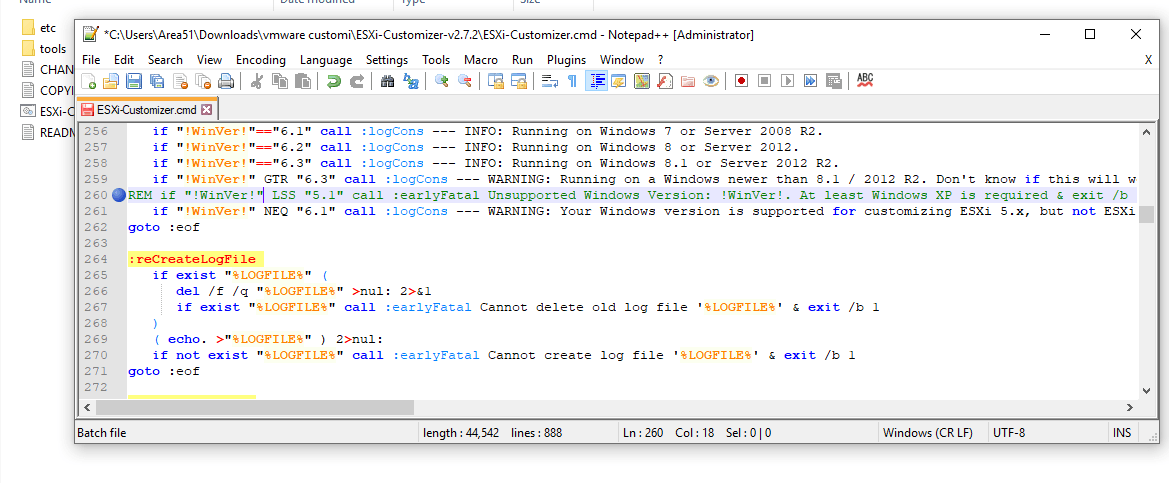
Open ESXi-Customizer.cmd file in Notepad++, and goto line 260 then add "REM" in the begin of the line
if "!WinVer!" LSS "5.1" call :earlyFatal Unsupported Windows Version: !WinVer!. At least Windows XP is required & exit /b 1
REM if "!WinVer!" LSS "5.1" call :earlyFatal Unsupported Windows Version: !WinVer!. At least Windows XP is required & exit /b 1
by Teffin Varghese | Jul 20, 2018 | Android, Howtos, JavaScript, Linux, Mac, Networking, News, OS, Programming, Python, Review, Security, Servers, Windows
Blockchains are incredibly popular now a days.
What is a block chain how do they work what problems do they solve and how can they be used.

Like the name indicates a blockchain is a chain of blocks that contain information, this technique was originally described in 1991 by a group of researchers and was originally intended to time stamp digital documents so it’s not possible to backdate them or to tamper with them,almost like a notary.
However it went by mostly unused until it adapted by Satoshi Nakamoto in 2009 to created a digital crypto currency called bitcoin.
Now a blockchain is distributed ledger that is completely open to anyone they having interesting property, once a data has been recorded inside a blockchain it becomes very difficult to change it.
So how does that works!!!
Well take a closer look at a block. Each block contains some data, the hash of the block and the hash of the previous block.

The data that is stored inside the blocks defines the type of blockchain, the Bitcoin blockchain for example solves the details of the transactions such as the sender, the receiver and the amount of coins.
A block also has a hash, you can compare the hash to a fingerprint it identifies a block and all it’s contents and it is always unique just as a finger print.
Once the block is created it’s hash is being calculated. Changing something inside the block cause the hash to change, to another words hashes are very useful when you want to detect the changes to the block. If the fingerprint of the block changes it’s no longer the same block.
The third element inside of each block is the hash of the previous block and this effectively creates a chain of block and it’s the technique that makes the blockchain so secure.

Here we have a chain of three blocks and each block has an hash of the block and the hash of the previous block.
The block number three points to the block number two and the number two points to number one.
Now the first block is little bit special, it cannot points to it’s previous block, because it is the first block we call this block the Genesis block.
Now let’s say if we tamper with the second block, this causes the hash of the block to be changed as well, in turn that will make block 3 and all following blocks invalid, because they no longer store a valid hash of the previous block.
So changing a single block will make all following blocks invalid.
But using a hash is not enough to prevent tampering. Computers these days are faster and calculate hundred of thousands of hashes per second, you can effectively tamper with the block and recalculate all the hashes of other block to make the blockchain valid again.
Proof of Work
So to mitigate this blockchain has something called proof of work. it’s a mechanism that slows down the creation of a new block.
In bitcoins case it take about 10 minutes to calculate the required proof of work and add a new block to the chain, this mechanism makes it very hard to tamper with one block you need to recalculate the proof of work of all the following block.
So the security of the blockchain comes from creative use of hashing and the proof of work mechanism, but there is one more way that the block chain secured themselves and that is by being distributed. Instead of using a central entity to manage chains, blockchains use a peer to peer network and every one is allowed to join.
When someone joins this network he gets a full copy of the blockchain the node can use this to verify that everything is in order.
Now lets see what happens if some one creates a new block, that the block is sent to everyone on the network, each node then verify the blocks to make sure that the block is not tamper with and if everything checks out each node add the block to their own blockchain. All the nodes in this network creates consensus, the agree about what blocks are valid and which aren’t.
Blocks that are tampered with will be rejected by the other nodes in the network. So to successfully tamper with a blockchain, you need to tamper with all the blocks on the chain, redo the proof of work for each block and take control of more than 50% of the peer to peer network.
Only then when your tampered block becomes accepted by everyone else, so this is almost impossible to do.

Blockchains are also constantly evolving and one of the most recent development is the creation of smart contract.
The contracts are simple programs that are stored on the blockchain and it can be used to automatically exchange coins based on certain conditions.
The creation of blockchain technology peek the lot of peoples interest. Soon others realize that the technology can be used for other things likes
> Storing medical records.
>> Creating digital notary.
>> Collecting taxes.

So now you know what a blockchain is how it works on a basic level and what problems they solve.
by George Sruthin | Mar 1, 2018 | Howtos, Linux, OS
By default gnome came with Fahrenheit as the unit for weather app , Fahrenheit was used as the official temperature scale only in the United States (including its unincorporated territories), its freely associated states in the western Pacific (Palau, the Federated States of Micronesia and the Marshall Islands), the Bahamas, Belize, and the Cayman Island. All other countries in the world now use the Celsius scale.
I am using Fedora and gnome as DE to change Fahrenheit to Celsius in gnome weather app you need to open terminal then type following command line
gsettings set org.gnome.GWeather temperature-unit "'centigrade'"
Now open gnome weather app again, by now the temperature unit scale will be changed from Fahrenheit to Centigrade .
to change Centigrade to Fahrenheit use this command line
gsettings set org.gnome.GWeather temperature-unit "'fahrenheit'"
I hope you find this article useful, please like our facebook page and share.