Select Page

Shadow AI: What Happens When Employees Use AI Without IT Approval?


Artificial intelligence is quickly becoming part of everyday work. Employees use AI tools to write emails, summarize documents, create presentations, analyze data, write code, and troubleshoot technical problems.

However, there is a growing security concern behind this productivity boost: Shadow AI.

Shadow AI refers to the use of AI tools or AI features by employees without the knowledge, approval, or governance of the organization's IT or security team.

The problem is not necessarily that employees are using AI. Instead, the problem is that IT may not know what tools are being used, what information is being shared, or how that information is being handled.

Shadow AI is similar to the idea of Shadow IT.

In traditional Shadow IT, employees might install unauthorized applications or use cloud services without informing IT.

With Shadow AI, employees may use public AI services, browser extensions, coding assistants, or AI-powered applications without going through the organization's security and approval process.

For example, an employee might copy a customer complaint into a public AI chatbot and ask:

"Summarize this and write a professional response."

The employee may only see this as a productivity shortcut. However, from a security perspective, company or customer information has now been sent to an external AI service.

That is where the risk begins.What Is Shadow AI?

Shadow AI is similar to the idea of Shadow IT.

In traditional Shadow IT, employees might install unauthorized applications or use cloud services without informing IT.

With Shadow AI, employees may use public AI services, browser extensions, coding assistants, or AI-powered applications without going through the organization's security and approval process.

For example, an employee might copy a customer complaint into a public AI chatbot and ask:

"Summarize this and write a professional response."

The employee may only see this as a productivity shortcut. However, from a security perspective, company or customer information has now been sent to an external AI service.

That is where the risk begins.

Shadow AI is similar to the idea of Shadow IT.

In traditional Shadow IT, employees might install unauthorized applications or use cloud services without informing IT.

With Shadow AI, employees may use public AI services, browser extensions, coding assistants, or AI-powered applications without going through the organization's security and approval process.

For example, an employee might copy a customer complaint into a public AI chatbot and ask:

"Summarize this and write a professional response."

The employee may only see this as a productivity shortcut. However, from a security perspective, company or customer information has now been sent to an external AI service.

That is where the risk begins.

Why Is Shadow AI a Security Problem?

The biggest concern is data exposure.

Employees may unknowingly provide AI tools with:

    • Customer information
    • Internal documents
    • Source code
    • Network configurations
    • Credentials or API keys
    • Financial information
    • Business strategies
    • Personally identifiable information (PII)

Consequently, an organization may lose visibility over where sensitive information is being processed.

NIST's AI Risk Management Framework specifically highlights information security and privacy as risks organizations should consider when adopting generative AI.

A Simple Example

Imagine a network administrator is troubleshooting a firewall issue.

They copy a configuration containing:

Firewall IP addresses
Public IP addresses
VPN configuration
Internal network information
Usernames

They then paste the configuration into an online AI tool and ask it to identify the problem.

The AI may provide a very useful answer.

However, the administrator may have unintentionally shared sensitive infrastructure information with an external service.

The technical problem may have been solved, but a security problem may have been created.

Shadow AI Is Not Always an "Unknown AI App"

This is an important distinction.

Organizations may approve a productivity application, but that application can later introduce new AI capabilities.

Therefore, simply maintaining a list of approved applications may not be enough.

Recent security discussions are increasingly focused on how employees interact with AI features, rather than only whether the application itself is approved.

For example:

Approved Application
        ↓
New AI Feature
        ↓
Employee Uses AI
        ↓
Sensitive Data Shared
        ↓
Security Team Has No Visibility

As a result, organizations need to think about AI usage and data handling, not just application approval.

Shadow AI and AI-Generated Code

Another growing concern is AI-assisted coding.

Developers can use AI tools to generate:

    • Scripts

    • PowerShell

    • Python

    • SQL
    • Infrastructure-as-code
    • Automation

This can significantly improve productivity. However, AI-generated code still needs to be reviewed before being used in production. For example, an employee may ask an AI tool to create a script that disables security controls or handles credentials. The script may work correctly, but it could contain insecure practices.Therefore, AI-generated code should go through the same security review as human-written code.

Should Companies Completely Block AI Tools?

Not necessarily. A complete ban may simply encourage employees to find ways around security controls. Instead, organizations should make secure and approved AI usage easier than unauthorized usage.

For example, companies can provide:

    • Approved AI tools
    • Clear AI usage policies
    • Data classification guidelines
    • DLP controls
    • Identity-based access
    • Logging and monitoring
    • Employee security training

As a result, employees can use AI while the organization maintains better visibility and control.

Shadow AI Best Practices

Organizations can reduce Shadow AI risks by following a few practical steps.

1. Create an AI Usage Policy

Clearly explain what employees can and cannot share with AI tools.

2. Provide Approved AI Tools

Instead of simply blocking AI, provide employees with secure alternatives.

3. Protect Sensitive Data

Employees should never paste passwords, API keys, confidential documents, customer data, or sensitive infrastructure information into public AI services.

4. Use DLP and Security Controls

Where appropriate, use Data Loss Prevention (DLP), endpoint controls, web filtering, and identity policies to detect and prevent inappropriate data sharing.

5. Monitor AI Usage

Security teams should understand which AI services are being accessed and how they are being used.

6. Train Employees

Most Shadow AI incidents may start with a simple misunderstanding rather than malicious intent.

Therefore, employees should understand what information is safe to share and what should remain inside the organization.

7. Review AI Tools Regularly

AI capabilities change quickly. Consequently, an application that was considered low-risk yesterday may introduce new AI functionality tomorrow.

Organizations should therefore review AI usage and security policies regularly.

Shadow AI: The Goal Is Control, Not a Ban

AI can provide significant productivity benefits.

Therefore, the objective should not simply be to prevent employees from using AI.

Instead, organizations should create a controlled environment where employees can use approved AI tools while protecting sensitive information.

Think of it this way:

Uncontrolled AI → Shadow AI → Low visibility → Higher risk

Whereas:

Approved AI → Clear policies → Monitoring → Controlled adoption

Final Thoughts

Shadow AI is becoming an important cybersecurity and governance challenge as organizations adopt AI faster than traditional IT policies can adapt.

However, the solution isn't necessarily to block everything.

Organizations should focus on visibility, data protection, identity, access control, employee awareness, and clear AI governance.

Most importantly, employees need to understand that AI tools should be treated like any other external service: don't share sensitive information unless your organization has approved the service and understands how that data is handled.

AI can be a powerful productivity tool. Nevertheless, without proper governance, that same productivity can introduce a new security risk.

The goal isn't to stop employees from using AI. The goal is to make sure they can use it safely.
Password Managers: Are They Really Safe? Best Practices You Should Know

Passwords are still one of the easiest ways for attackers to gain access to online accounts. Unfortunately, many people still reuse the same password across multiple websites or store passwords in places that are not designed for secure password management.

As the number of online accounts continues to grow, remembering a different strong password for every service becomes difficult. This is where password managers can help.

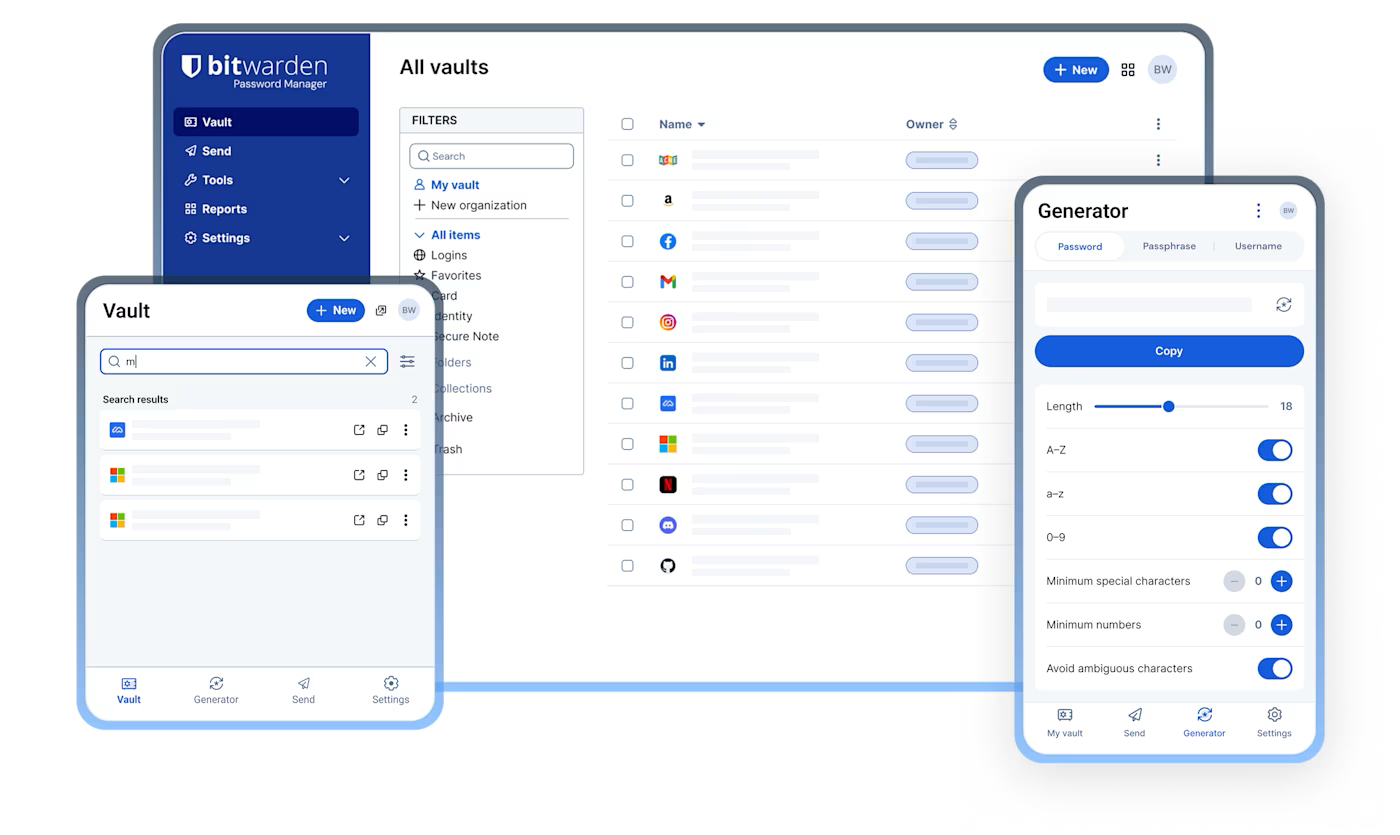
I personally use Bitwarden to manage my passwords. However, regardless of which password manager you choose, there are some important security best practices you should follow.

bitwarden

Are Password Managers Safe?

Generally, yes. Reputable password managers use encryption and security controls to protect your stored credentials.

However, a password manager is not a replacement for good security practices. Your master password, devices, and account recovery methods still need to be protected.

In other words, a password manager can improve your security significantly, but only when it is used correctly.

1. Use a Strong and Unique Master Password

Your master password protects your password vault, so it is one of the most important passwords you will ever create.

Therefore, make it:

  • Long and difficult to guess
  • Unique
  • Easy for you to remember
  • Never reused on another website

A long passphrase made from several unrelated words can be easier to remember while still providing strong security.

Never use your password manager's master password anywhere else.

2. Never Reuse Passwords

One of the biggest advantages of a password manager is the ability to create a unique password for every account.

For example, your email, banking, social media, and work accounts should all have different passwords.

Why is this important?

If one website suffers a data breach and your password is exposed, attackers may try the same password on other services.

Therefore, one account should have one unique password.

3. Don't Save Passwords in Your Browser

Modern browsers offer to save passwords, which is convenient. However, storing all your credentials directly in your browser may not provide the same level of password-management features and control as a dedicated password manager.

Instead, use a reputable password manager to centralize your credentials and manage them securely.

For example, rather than saving passwords in Chrome, Edge, or Firefox, you can store them in your dedicated password manager.

This also makes it easier to manage passwords across different browsers and devices.

4. Enable Multi-Factor Authentication

A strong password is important, but Multi-Factor Authentication (MFA) provides another layer of protection.

Whenever possible, enable MFA for:

  • Your password manager
  • Email accounts
  • Banking accounts
  • Social media
  • Cloud services
  • Business applications

As a result, even if someone obtains your password, they may still be unable to access your account.

For your password manager itself, consider using a strong second factor such as an authenticator application or security key when supported.

5. Never Share Your Passwords

Your passwords should remain private.

Avoid sending passwords through:

  • WhatsApp
  • Email
  • SMS
  • Chat applications
  • Screenshots
  • Notes or documents

Even if you trust the recipient, sharing passwords increases the risk of accidental exposure.

If credentials must be shared for legitimate business reasons, use the secure sharing features provided by your password management solution rather than sending the password as plain text.

6. Don't Store Passwords in Plain Text

Avoid keeping passwords in:

  • Notepad files
  • Excel spreadsheets
  • Word documents
  • Text files
  • Sticky notes
  • Email drafts

Although these methods may seem convenient, they provide little protection if your device or account is compromised.

Instead, use a dedicated password manager designed to protect sensitive credentials.

7. Generate Strong Passwords

Don't create passwords manually whenever possible.

Instead, use your password manager's built-in password generator to create random and unique credentials.

For example:

K8!vQ2#pL9@xT7

You don't need to remember this password because your password manager does that for you.

Consequently, you can use stronger and more complex passwords without making your daily login process difficult.

8. Secure Your Password Manager Account

Your password manager itself must be protected carefully.

Therefore:

  • Use a strong master password
  • Enable MFA
  • Keep recovery information secure
  • Don't share your master password
  • Keep your devices updated
  • Lock your password manager when appropriate

Remember that your password manager is protecting many other accounts, so it deserves extra attention.

9. Regularly Review Your Passwords

Finally, don't simply save passwords and forget about them.

Periodically review your password vault and:

  • Remove unused accounts
  • Replace weak passwords
  • Change reused passwords
  • Check for compromised credentials
  • Review important account security settings

In addition, prioritize critical accounts such as email, banking, cloud storage, and business systems.

bitwarden Frame_1321317570

Final Thoughts

Password managers are not completely risk-free. However, they are generally much safer than reusing passwords, storing them in plain-text files, or using simple passwords that are easy to guess.

The most important thing is to use them correctly.

Use a strong and unique master password, generate a different password for every account, avoid saving credentials directly in your browser, enable MFA, and never share your passwords.

I use Bitwarden as part of my own password security strategy. Nevertheless, the same principles apply regardless of which reputable password manager you choose.

Ultimately, good password security is not about remembering more passwords. It's about making every password unique, difficult to guess, and properly protected.

The Ivory Tower Effect: Why Great Ideas Sometimes Fail in the Real World

Every business is built on decisions. Some are strategic, some are technical, and others shape the future of the entire organization. But even the smartest decisions can fail when they're made too far away from the people who deal with the day-to-day reality.

This is often referred to as the Ivory Tower Effect—a situation where leadership becomes disconnected from frontline teams. It's not about poor leadership or bad intentions; it's about missing the practical context needed to make informed decisions.

When Good Intentions Lead to Bad Outcomes

The Ivory Tower Effect can appear in almost any organization.

For example:

  • A company cuts IT costs, only to experience more downtime and slower support.
  • Leadership approves a new platform without realizing it must integrate with aging legacy systems.
  • Aggressive project deadlines are set without considering testing, security, or resource limitations.
  • Security expectations increase while budgets and staffing are reduced.

On paper, these decisions may seem logical. In practice, they can introduce unnecessary risks, frustrate employees, and reduce the quality of service.

ivory tower before and after

Why Does It Happen?

As organizations grow, leaders naturally focus on business strategy, revenue, growth, and customer expectations. Meanwhile, engineers, IT professionals, support teams, and operational staff focus on keeping systems reliable, secure, and efficient.

Both perspectives are essential. Problems arise when communication between them becomes one-sided.

Without regular feedback from the people closest to the work, decisions are often based on assumptions instead of real-world experience.

The Cost of the Disconnect

The impact isn't always immediate, but over time it becomes visible:

  • Increased technical debt
  • Higher operational costs
  • Employee burnout
  • Security vulnerabilities
  • Delayed projects
  • Poor customer experiences

Ironically, decisions intended to improve efficiency or reduce costs can end up doing the exact opposite.

What Great Leaders Do Differently

The most effective leaders understand that valuable insights don't come from job titles alone—they come from experience.

Instead of making decisions in isolation, they:

  • Listen to technical and operational teams before major changes.
  • Encourage honest feedback, even when it's uncomfortable.
  • Include subject matter experts in planning and decision-making.
  • Balance business goals with technical realities.

Strong leadership isn't about having all the answers. It's about creating an environment where the right people are heard before important decisions are made.

Final Thoughts

The Ivory Tower Effect isn't a leadership flaw—it's a communication gap.

Organizations perform at their best when leadership understands operational challenges and frontline teams understand the business vision. Bridging that gap leads to smarter decisions, stronger collaboration, and better long-term outcomes.

In today's world of cloud computing, cybersecurity, AI, and digital transformation, success depends on more than strategy alone. It depends on listening, collaborating, and ensuring every level of the organization has a voice.

Have you encountered the Ivory Tower Effect in your workplace? How did it impact your team or project? Share your thoughts in the comments.

The Inspiration Behind This Article ⭐

Special thanks to Jake on LinkedIn for the inspiration behind this blog post. Your thoughts on the "Ivory Tower" concept encouraged me to expand on the idea and explore how it impacts leadership, IT, and organizational decision-making.

Top 10 Backup Mistakes That Can Cost Your Business Millions

Data is one of the most valuable assets a business owns. Yet many organizations invest in backup solutions without following the best practices needed to ensure those backups are actually recoverable.

Whether it's a ransomware attack, hardware failure, accidental deletion, or natural disaster, a poorly designed backup strategy can lead to extended downtime, financial loss, and damaged customer trust.

Here are the 10 most common backup mistakes that businesses make—and how to avoid them.

1. Having Only One Backup Copy

Keeping a single backup is a major risk. If that backup becomes corrupted, encrypted, or accidentally deleted, recovery may be impossible. Therefore, maintaining multiple backup copies is essential.

Best Practice: Follow the 3-2-1-1-0 backup strategy by maintaining multiple copies of your data across different storage locations.

2. Never Testing Backup Restores

Many organizations assume their backups are working because backup jobs complete successfully. Unfortunately, a successful backup doesn't always guarantee a successful restore.

Best Practice: Schedule regular restore tests to verify backup integrity and ensure recovery procedures work as expected.

3. Not Using Immutable Backups

Modern ransomware specifically targets backup repositories. As a result, organizations that don't use immutable storage risk losing both production data and backup copies. If attackers can delete or encrypt your backups, your recovery options become extremely limited.

Best Practice: Store at least one backup copy in an immutable repository where backup files cannot be modified or deleted during the retention period.

4. Storing All Backups in One Location

Keeping every backup in the same building exposes your business to risks such as fire, flooding, theft, or power failures. For this reason, at least one backup copy should always be stored offsite.

Best Practice: Maintain at least one offsite backup copy or use secure cloud storage for disaster recovery.

5. Using the Same Administrator Credentials Everywhere

If backup infrastructure shares the same administrator credentials as production systems, attackers can compromise everything with a single account.

Best Practice: Use dedicated administrator accounts, enable Multi-Factor Authentication (MFA), and apply the principle of least privilege.

6. Ignoring Backup Monitoring

Failed backup jobs often go unnoticed until recovery is needed.

Best Practice: Monitor backup jobs daily and configure alerts for failed or missed backups.

7. Keeping Backup Servers on the Production Network

If ransomware spreads through the production environment, backup servers connected to the same network may also be compromised.

Best Practice: Isolate backup infrastructure using network segmentation and dedicated management access.

8. Poor Backup Retention Policies

Very short retention periods may leave you without a clean recovery point if ransomware remains undetected for several weeks.

Best Practice: Review your retention policies regularly and align them with your business and compliance requirements.

9. Delaying Software Updates

Outdated backup software and operating systems may contain vulnerabilities that attackers can exploit.

Best Practice: Keep backup applications, operating systems, and firmware updated with the latest security patches.

10. Having No Disaster Recovery Plan

Backups alone are not enough. Without documented recovery procedures, restoring critical systems can take far longer than expected.

Best Practice: Develop a disaster recovery plan, document recovery priorities, and conduct periodic recovery drills with your IT team.

Final Thoughts

A reliable backup strategy is more than just scheduling backup jobs—it's about ensuring your business can recover quickly when disaster strikes.

By avoiding these common mistakes and following industry best practices such as the 3-2-1-1-0 backup strategy, immutable storage, offsite backups, and regular restore testing, organizations can significantly reduce the impact of ransomware, hardware failures, and other unexpected events.

Whether you're using Veeam Backup & Replication or another enterprise backup solution, the principles remain the same: secure your backups, verify them regularly, and always be prepared to restore when it matters most.

Immutable Backups Explained: The Best Defense Against Ransomware

Ransomware attacks have become more sophisticated than ever. Today's attackers don't just encrypt production servers—they also target backup repositories, making recovery nearly impossible if your backups aren't properly protected.

That's why organizations are adopting the 3-2-1-1-0 backup strategy, combined with immutable backup repositories, to ensure they can recover quickly without paying a ransom.

In this article, I'll explain these backup best practices using Veeam Backup & Replication as a practical example. While the concepts discussed apply to any modern backup solution that supports immutable storage and secure backup architectures, Veeam provides an excellent reference for demonstrating how these best practices can be implemented in a real-world environment.

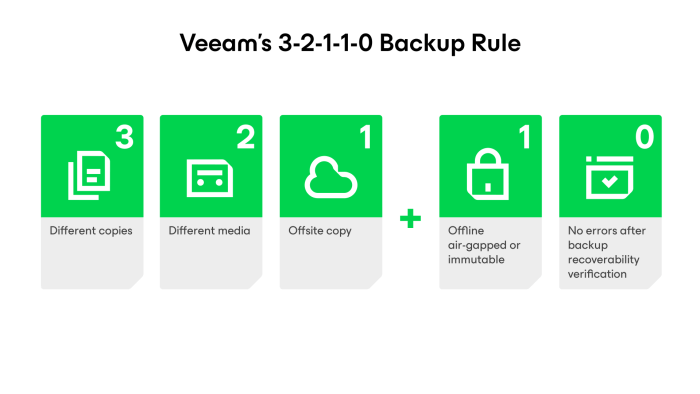
3-2-1-backup-rule-illustration

What is the 3-2-1-1-0 Backup Rule?

The 3-2-1-1-0 rule is considered the gold standard for backup protection.

Rule Meaning
3 Keep three copies of your data (production + two backups).

2

Store backups on two different types of storage.
1 Keep one backup copy offsite.
0 Keep one backup copy immutable or offline.
0 Regularly verify backups to ensure zero restore errors.


Following this strategy helps protect your business from hardware failures, accidental deletion, and ransomware attacks.

Why Traditional Backups Are No Longer Enough

Many organizations still rely on Windows file shares or NAS devices as backup repositories. While convenient, these repositories are often accessible to attackers if they compromise administrator credentials.

If ransomware can access your backup repository, it may encrypt or delete your backup files before attacking production systems.

This is why backup security is just as important as endpoint and network security.

What is an Immutable Backup?

An immutable backup cannot be modified or deleted until its retention period expires—even by an administrator.

This means that even if ransomware gains access to your backup server, your backup files remain protected.

Modern backup solutions like Veeam Backup & Replication support immutable repositories hosted on Linux, making them an excellent choice for ransomware protection.

Why Use a Linux Immutable Repository?

Linux repositories have become the preferred option for secure backups because they offer:

  • Better protection against ransomware
  • Lower attack surface than Windows
  • Native support for immutable backup files
  • High performance with filesystems like XFS

For Veeam users, a dedicated Linux repository is considered a best practice for protecting backup data.

Immutable Backup vs Air-Gapped Backup

Although often used together, they serve different purposes.

Immutable Backup Air-Gapped Backup
Always connected to the network Completely disconnected from the network
Backup files cannot be modified or deleted Backup media is physically isolated
Fast recovery Maximum protection against cyberattacks

For the best protection, maintain both an immutable backup repository for daily recovery and an air-gapped copy for disaster recovery.

Backup Best Practices

To build a ransomware-resilient backup environment:

  • Follow the 3-2-1-1-0 backup rule
  • Use a dedicated Linux immutable repository
  • Keep one backup copy offsite
  • Enable multi-factor authentication (MFA)
  • Use separate administrator accounts for backup infrastructure
  • Regularly test backup restores
  • Monitor backup jobs and resolve failures promptly
  • Keep your backup software and operating systems up to date

Final Thoughts

No security solution can guarantee complete protection from ransomware. However, a well-designed backup strategy ensures your business can recover quickly without paying a ransom.

By combining the 3-2-1-1-0 backup rule, Veeam immutable repositories, and air-gapped backups, organizations can significantly improve their cyber resilience and minimize downtime during an attack.

Investing in secure backups today is one of the smartest decisions you can make to protect your business tomorrow.

Pin It on Pinterest