by Teffin Varghese | Oct 31, 2021 | Hosting, Howtos, Linux, Networking, OS, Review, Security, Servers, Troubleshooting, Unix, VPN, VPS, Vulnerability, Workstation
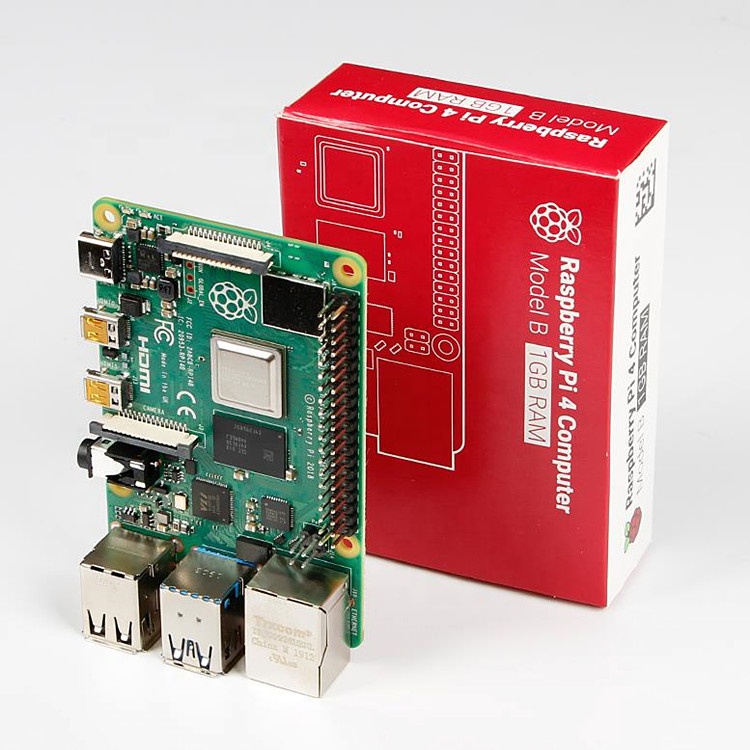
For the 64-Bit OS support we need to use Raspberry Pi 4
I’m using Raspberry Pi 4 Model-B With * Gigs of RAM, A 4GB RAM model would work just fine.
But First what is Raspberry Pi and what is it used for ?
he Raspberry Pi is a low cost, credit-card sized computer that plugs into a computer monitor or TV, and uses a standard keyboard and mouse.
It is a capable little device that enables people of all ages to explore computing, and to learn how to program in languages like Scratch and Python.
It’s capable of doing everything you’d expect a desktop computer to do, from browsing the internet and playing high-definition video, to making spreadsheets, word-processing, and playing games.
What’s more, the Raspberry Pi has the ability to interact with the outside world, and has been used in a wide array of digital maker projects, from music machines and parent detectors to weather stations and tweeting birdhouses with infra-red cameras.
We want to see the Raspberry Pi being used by kids all over the world to learn to program and understand how computers work.
Assemble and enclose the Raspberry Pi, We recommend a case with passive cooling or with a small fan and heat-sinks.
Yes of course you can the Pi without any case or cooling setup, But we recommend to use a cooling case for protection and better performance.
Download Kali-Linux Image from the official website.
You can get the download link from the below URL.
You need to select ARM image category, then choose the Raspberry Pi 64-bit Image.
Now you need to write this image to a Micro SD card, Which you are going to use it on your Raspberry Pi.
You can use either Balena Etcher or the official Raspberry Pi imager for this task.
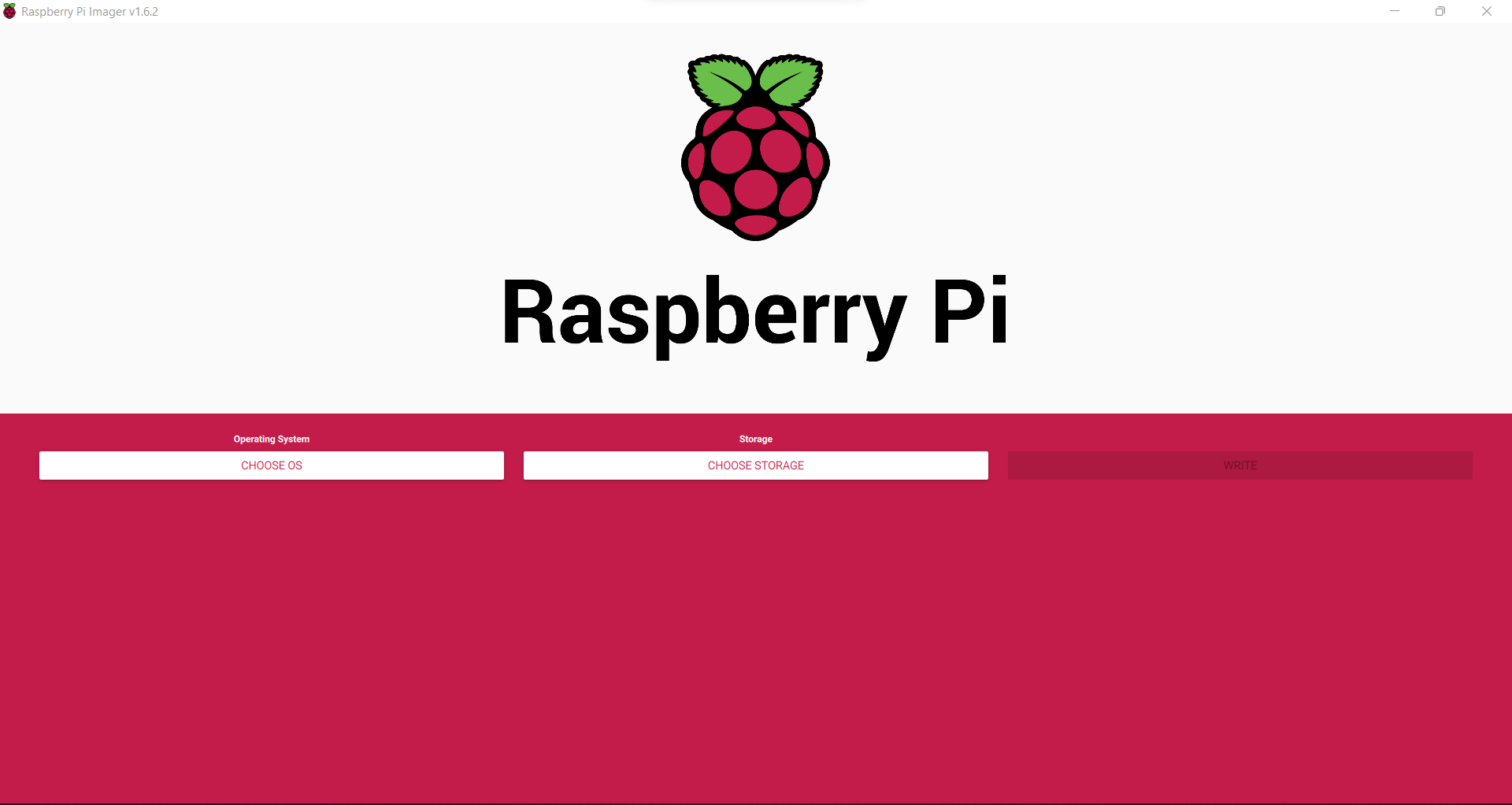
Here we are using the official Raspberry Pi imager. You can download the imager from the following URL.
https://www.raspberrypi.com/software/
Here is the download link for Windows machines
https://downloads.raspberrypi.org/imager/imager_1.6.2.exe
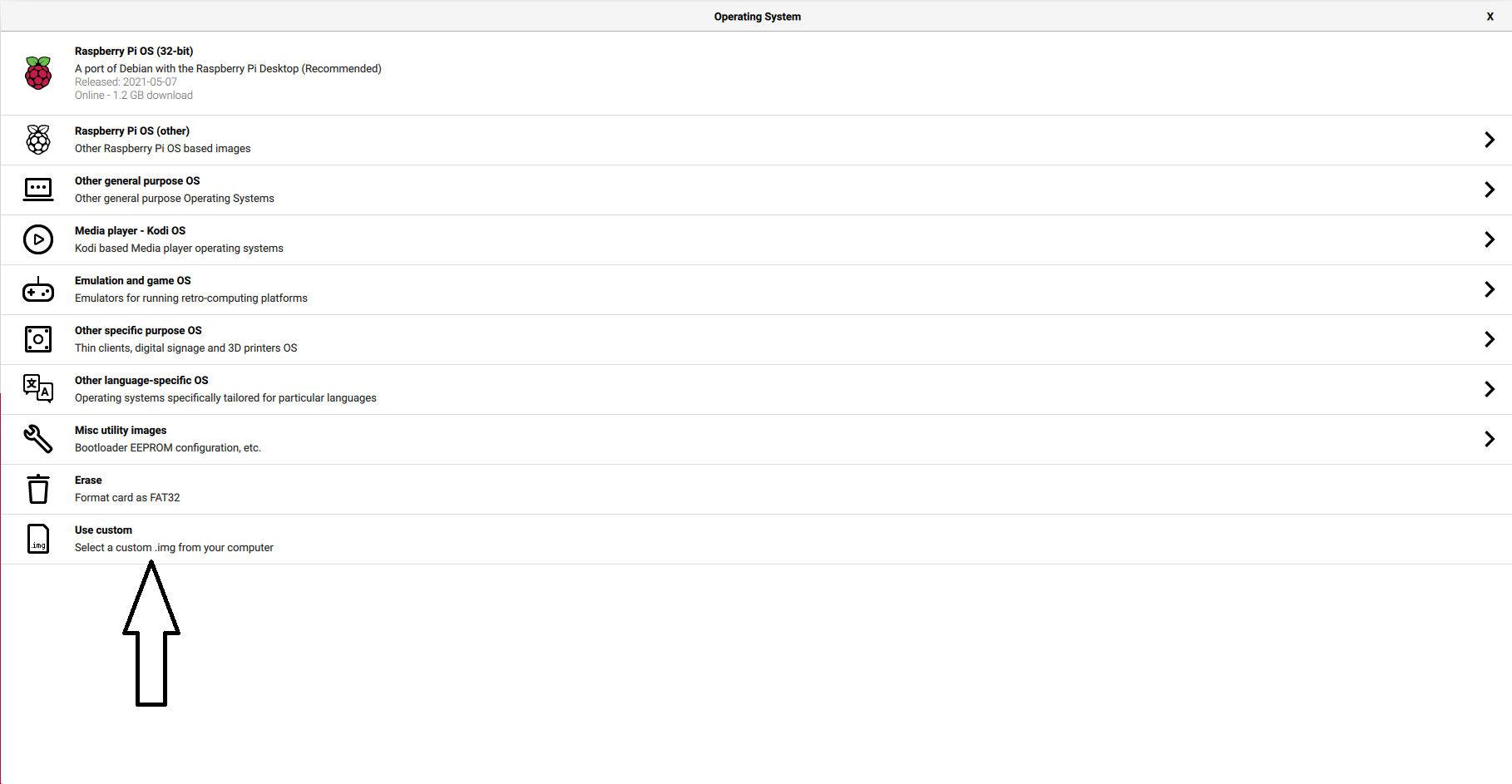
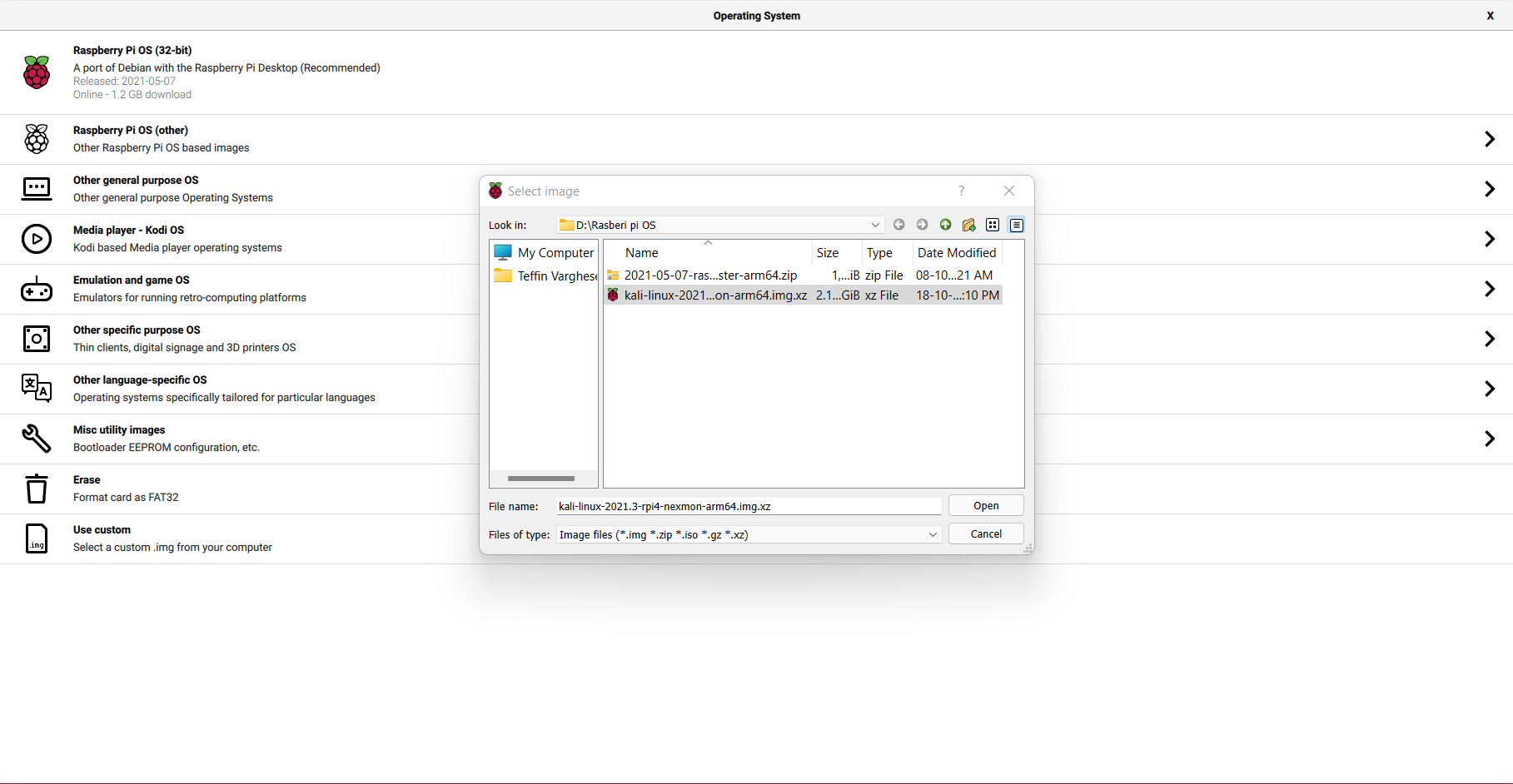
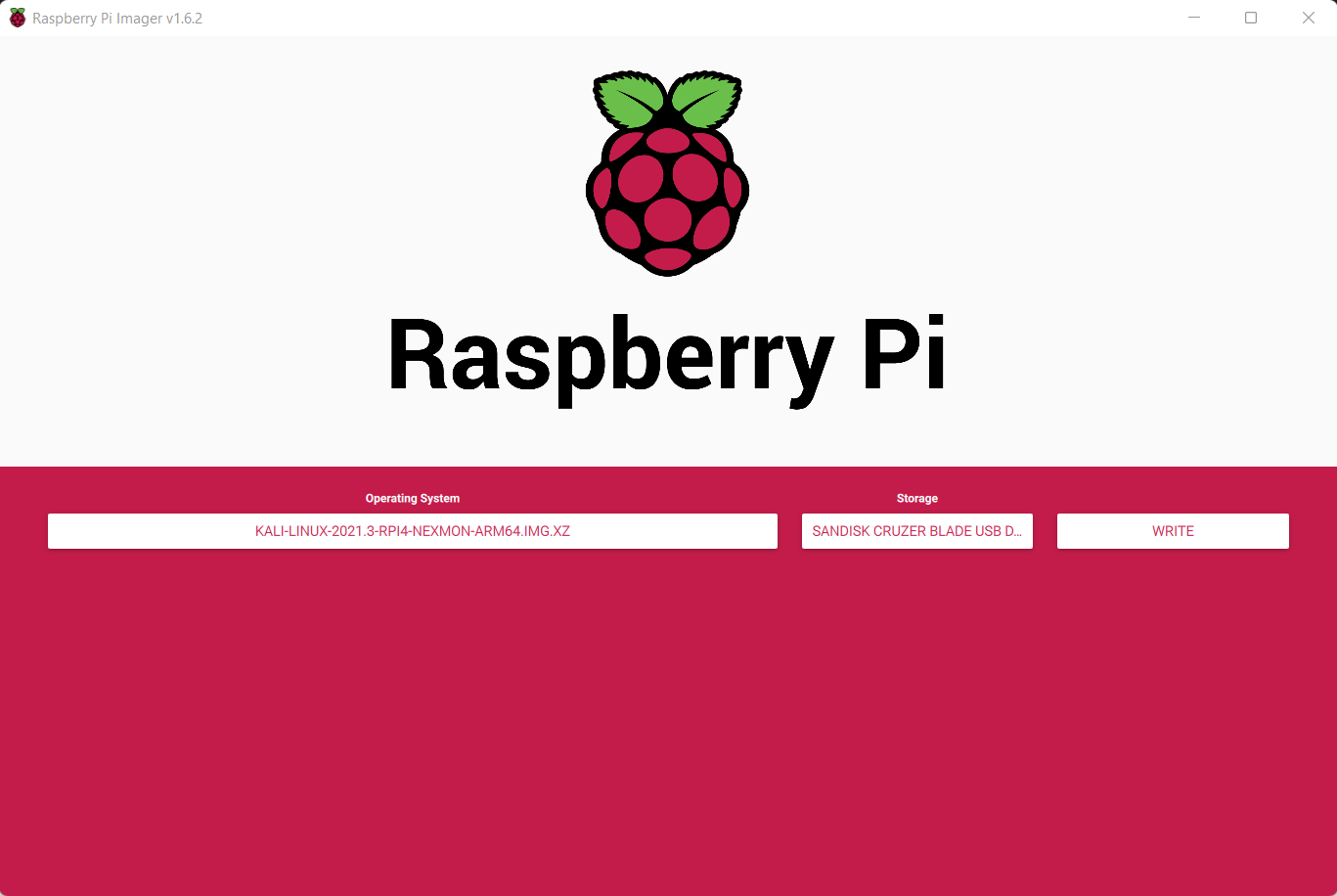
Write Kali-Linux image to the Micro SD-Card. Please follow the following images.
1, Launch the Pi Imager and select Choose OS.
2, Select the option “Use Custome” for our Kali-Linux Image
3, Browse and choose the Kali-Linux Image we have downloaded from our PC.
4, Now select storage and choose our micro SD-Card and click write to write the Image.
Note: Please make sure you have selected the correct storage, In our case the SD-Card. If you choose the wrong location the imager will wipe the selected storage location.
- step 5
Insert the Micro SD-card to your Raspberry Pi. Plug in your Raspberry Pi Power-Brick to the device and
connect your Pi to a monitor, also plugin your Mouse and Keyboard as well, Then power-on the power brick.
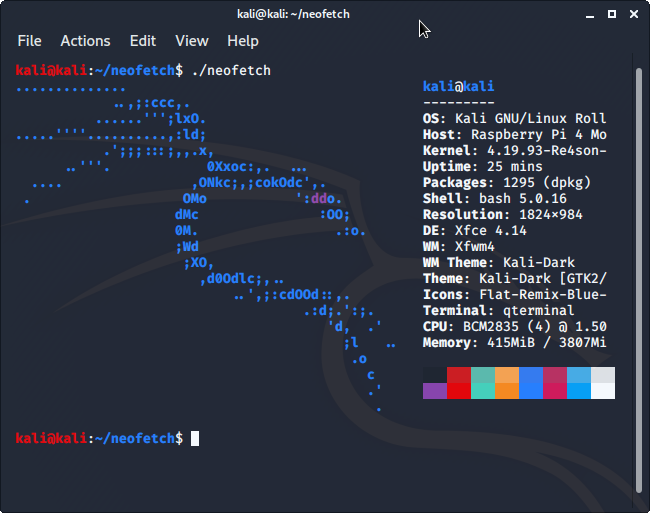
It will take some time for the initial bootup, Wait for it. If everything is perfect your Raspberry Pi will boot into Kali-Linux.
by Teffin Varghese | Jul 20, 2020 | Howtos, Linux, Networking, News, OS, Review
NVMe over Fabrics
The performance of storage technology increased 100 times in the last 5 years.
with the introduction if flash based solid state drives SSD’s especially SSD’s connected over NVMe Non volatile memory express is a specification which enables a SSD to take advantage of high speed peripheral component interconnect express PCIe bus in the computer by connecting directly into it.
As the performance of the storage gets faster, the network wire speed and protocols become the bottleneck we can speed up the wires with the latest Ethernet and Inifiniband speeds. But without faster protocol technologies these new SSD’s and NVMe technologies will have their performance locked up inside the server.
NVMe over Fabrics NVMe-oF is an exciting networking storage technology. allowing you to take full advantages of SSD’s performance across ether net or Infiniband networks. NVMe-oF is designed to leverage the performance of NVMe technology across the network using RDMA (remote direct memory access) RDMA enables data in memory to transfer between computers and storage devices across the network with little to no CPU usage.
NVMe over fabrics technology enables.
1, Extremely high bandwidth.
2, Low fabric latency.
3, Scalability, management and storage fault isolation.
4, Better utilization of the storage, rack-space and power.
5, Sharing storage across multiple servers.
6, Compute and storage can be disconnected from each other or dis-aggregated.
NVMe-oF is the perfect technology to fill the recent performance gap between storage and storage network technology
Cheers!!!
by Teffin Varghese | Dec 13, 2019 | Hosting, Linux, Networking, Review, Servers, VMware Esxi, Windows
What is Cloud Computing?

Cloud computing is an on demand delivery of IT resources via the internet with pay as you go pricing instead of buying and owning and maintaining physical data-centers and servers. You access technology service such as computing power,storage and databases on as needed basis from a cloud provider like AWS,AZURE,Google Cloud etc.
Organizations of every type and size industry are using the cloud for a wide verity of use-cases such as data backup, disaster recovery,email,virtual desktops,Software development and testing,big data analytics and customer facing web applications. For example the health care companies are using the cloud to develop more personalize treatment for patients. Financial services companies are using the cloud to power real time fraud detection and prevention and video-game makers are using the cloud to deliver online games to millions of players around the globe.
With cloud computing your business can be more agile,reduce cost,instantly scaled and deployed globally in minutes. Cloud computing provides you instant access to broad range of technologies that you can innovate-faster and build nearly anything like infrastructure services to compute,storage and databases to IoT to machine learning,data analytics and much more.
You can deploy technology services in a matter of minutes and get from idea to implementation several orders of magnitude faster than before. This gives you the freedom to experiment and test new ideas to differentiate customer experience and transform your business,Such as adding machine learning and intelligence to your applications in order to personalize your experience to your customers and improve their engagement.
You don’t need to make large upfront investments in hardware and overpay for capacity you don’t use, Instead you can use trade capital expense for variable expense and only pay for IT when you consumes it. With cloud computing you access resource from the cloud in real-time as they needed. You can scale these new resources up and down to grow and shrink capacity instantly as your business changed. Cloud computing also make it easy to expand to new regions and apply globally in minutes. For example AWS has infrastructure all around the world.Putting applications to closer proximity to end users reduced latency and improve their experiences.
No matter your location, size and industry the cloud frees you managing infrastructure and data-centers, So you can focus on what matters the most to your business.
by Teffin Varghese | Jul 20, 2018 | Android, Howtos, JavaScript, Linux, Mac, Networking, News, OS, Programming, Python, Review, Security, Servers, Windows
Blockchains are incredibly popular now a days.
What is a block chain how do they work what problems do they solve and how can they be used.

Like the name indicates a blockchain is a chain of blocks that contain information, this technique was originally described in 1991 by a group of researchers and was originally intended to time stamp digital documents so it’s not possible to backdate them or to tamper with them,almost like a notary.
However it went by mostly unused until it adapted by Satoshi Nakamoto in 2009 to created a digital crypto currency called bitcoin.
Now a blockchain is distributed ledger that is completely open to anyone they having interesting property, once a data has been recorded inside a blockchain it becomes very difficult to change it.
So how does that works!!!
Well take a closer look at a block. Each block contains some data, the hash of the block and the hash of the previous block.

The data that is stored inside the blocks defines the type of blockchain, the Bitcoin blockchain for example solves the details of the transactions such as the sender, the receiver and the amount of coins.
A block also has a hash, you can compare the hash to a fingerprint it identifies a block and all it’s contents and it is always unique just as a finger print.
Once the block is created it’s hash is being calculated. Changing something inside the block cause the hash to change, to another words hashes are very useful when you want to detect the changes to the block. If the fingerprint of the block changes it’s no longer the same block.
The third element inside of each block is the hash of the previous block and this effectively creates a chain of block and it’s the technique that makes the blockchain so secure.

Here we have a chain of three blocks and each block has an hash of the block and the hash of the previous block.
The block number three points to the block number two and the number two points to number one.
Now the first block is little bit special, it cannot points to it’s previous block, because it is the first block we call this block the Genesis block.
Now let’s say if we tamper with the second block, this causes the hash of the block to be changed as well, in turn that will make block 3 and all following blocks invalid, because they no longer store a valid hash of the previous block.
So changing a single block will make all following blocks invalid.
But using a hash is not enough to prevent tampering. Computers these days are faster and calculate hundred of thousands of hashes per second, you can effectively tamper with the block and recalculate all the hashes of other block to make the blockchain valid again.
Proof of Work
So to mitigate this blockchain has something called proof of work. it’s a mechanism that slows down the creation of a new block.
In bitcoins case it take about 10 minutes to calculate the required proof of work and add a new block to the chain, this mechanism makes it very hard to tamper with one block you need to recalculate the proof of work of all the following block.
So the security of the blockchain comes from creative use of hashing and the proof of work mechanism, but there is one more way that the block chain secured themselves and that is by being distributed. Instead of using a central entity to manage chains, blockchains use a peer to peer network and every one is allowed to join.
When someone joins this network he gets a full copy of the blockchain the node can use this to verify that everything is in order.
Now lets see what happens if some one creates a new block, that the block is sent to everyone on the network, each node then verify the blocks to make sure that the block is not tamper with and if everything checks out each node add the block to their own blockchain. All the nodes in this network creates consensus, the agree about what blocks are valid and which aren’t.
Blocks that are tampered with will be rejected by the other nodes in the network. So to successfully tamper with a blockchain, you need to tamper with all the blocks on the chain, redo the proof of work for each block and take control of more than 50% of the peer to peer network.
Only then when your tampered block becomes accepted by everyone else, so this is almost impossible to do.

Blockchains are also constantly evolving and one of the most recent development is the creation of smart contract.
The contracts are simple programs that are stored on the blockchain and it can be used to automatically exchange coins based on certain conditions.
The creation of blockchain technology peek the lot of peoples interest. Soon others realize that the technology can be used for other things likes
> Storing medical records.
>> Creating digital notary.
>> Collecting taxes.

So now you know what a blockchain is how it works on a basic level and what problems they solve.
by George Sruthin | May 12, 2018 | Review
I Bought Rii i8 Mini Wireless Touchpad with Keyboard on December Last year, so I thought it will be nice to make a review on the product
I have been using this product for the last 5 months and I found this is a very useful gadget which you must purchase
There are may model of full-sized Keyboards, Mini Keyboard with the touchpad & Mouse (which I didn't find any product related to it) is available on their website product list, First of all, let me introduce the manufacture of this product, Rii stands for Riiket (AKA)"Shenzhen Riiket Technology Company",
I found this Bluetooth Mini keyboard + touchpad on Amazon at a very cheap price, I have put a link to this post so that you can easily find the product which I purchase, there are many models available (for eg: there is a similar model named Rii i8+ which has backlight and another cools features) but for my needs this is will do much better, okay let me tell you the features
Unboxing Pictures
Package Contents
- Keyboard touchpad combo & USB Bluetooth Dongle(inside)
- USB Wireless Receiver
- User Manual
- USB Charging cable
- Battery 810mAh (inside)
As far as I know, there are two more variants are available in the market, I will share you the links below
Rii i8+ Variant (Six Colors Available)
User Experience
Well Rii i8 Mini is the minimal and cheap and outdated design it doesn't come with back light or any other cool features like its other variants if you have are planning to set up a Home theater with a cheap handy Bluetooth Keyboard & Touch pad this is it, it has a full QWERTY keyboard & dedicated buttons like search, home(open My computer, or in Linux opens home directory ), browser home button, function keys, one pair of right & left click, dedicated media controls like volume up down, play forward/backward, pause, up/down/left/right keys etc
so far so impressive, just plug and play, I have used this on my Ubuntu PC, Fedora Workstation, Windows 10, and my android phone with help of an OTG cable, just connect dongle it just works

if we consider the power usage well it depends, for me it's like 2 charging for the last 5 months because I only use this keyboard when ever its required, one thing I have noticed is that when battery is about to drain out your touchpad will fail to respond properly, first it thought it may be a hardware issue, after recharging it fixed
I haven't tried next versions of this keyboards yet, now I am planning to make a review on those products in the future