by George Sruthin | Aug 23, 2020 | Hosting, Howtos, Linux, MySQL, Servers, VPS
Some time you may find MySQL stopped working and failed to start, and if you check status of MySQL using "systemctl status mysql" or "journalctl -xe" you can find that your "filesystem is out of space"
OK first of all, we have to determine which disk partition is full, MySQL can be configured to store data on different disk or partition. by default it will be stored in /var/lib/mysql , i am going to use df command and find out how much space it uses, btw my vps has 20Gb of file system.
root@testserver:~# du -sh /var/lib/mysql
13G    /var/lib/mysql
root@coversunkochi:~#
root@coversunkochi:~# lsblk
NAME    MAJ:MIN RM  SIZE RO TYPE MOUNTPOINT
sda       8:0    0 19.1G  0 disk
├─sda1    8:1    0   19G  0 part /
├─sda14   8:14   0    1M  0 part
└─sda15   8:15   0   61M  0 part /boot/efi
root@coversunkochi:~#
root@coversunkochi:~# df -h /
Filesystem      Size  Used Avail Use% Mounted on
/dev/sda1        19G  18.6G   403M  99% /
As you can see my vps has a root directory of 19 Gb and /var/lib/msql uses 13Gb. and total of 18.6 Gb is used by filesystem.
To Fix this i have 3 Methods.
- Manually delete Log files.
- Using MySQL (Only works if mysql is starts)
- Set Persist binlog settings(this will automatically delete logs after number of days you set)
Ok Lets get started.
Method #1 Manually Delete Log files.
you need to change directory to /var/lib/mysql, if you type type "du-bsh *" you can find your logs some thing like this, for tutorial i have only listed binlog files you can see the file name binlog.000141 to binlog.000148 these are the files which consumes most of you filesystem.
root@coversunkochi:/var/lib/mysql# du -bsh *
48M     /var/lib/mysql/binlog.000141
102M    /var/lib/mysql/binlog.000142
67M     /var/lib/mysql/binlog.000143
104M    /var/lib/mysql/binlog.000144
102M    /var/lib/mysql/binlog.000145
101M    /var/lib/mysql/binlog.000146
103M    /var/lib/mysql/binlog.000147
44M     /var/lib/mysql/binlog.000148
you can also find bindlog.index file this contains log files name, you be careful to do some thing stupid, you need take a backup first, then edit this file and remove indexing "remove names of logs" then save this.
after that you can delete files which is not in the index
now you can restart msyql it will start.
Method #2 Using MySQL
If you MySQL is still working you need to access MySQL then type following command, login to MySQL.
mysql> SHOW BINARY LOGS;
+---------------+-----------+-----------+
| Log_name      | File_size | Encrypted |
+---------------+-----------+-----------+
| binlog.000141 |  50260145 | No        |
| binlog.000142 | 106706425 | No        |
| binlog.000143 |  69240464 | No        |
| binlog.000144 | 108516594 | No        |
| binlog.000145 | 106324989 | No        |
| binlog.000146 | 105725450 | No        |
| binlog.000147 | 107466759 | No        |
| binlog.000148 |  98082094 | No        |
+---------------+-----------+-----------+
this will list your binary logs index, to delete logs to a certain number, i am going to delete binlog.000141 so i need to type command like this, the number mentioned below is the number of log which should apper in index file after removing, so in our case 141 will be deteted or all logs from 1 to 141 and rest of the logs will remain.
mysql> PURGE BINARY LOGS TO 'binlog.000142';
I have put MySQL logs for comparison before and after doing the purge.
mysql> SHOW BINARY LOGS;
+---------------+-----------+-----------+
| Log_name      | File_size | Encrypted |
+---------------+-----------+-----------+
| binlog.000141 |  50260145 | No        |
| binlog.000142 | 106706425 | No        |
| binlog.000143 |  69240464 | No        |
| binlog.000144 | 108516594 | No        |
| binlog.000145 | 106324989 | No        |
| binlog.000146 | 105725450 | No        |
| binlog.000147 | 107466759 | No        |
| binlog.000148 |  98082094 | No        |
+---------------+-----------+-----------+
8 rows in set (0.01 sec)

mysql> PURGE BINARY LOGS TO 'binlog.000142';
Query OK, 0 rows affected (0.01 sec)

mysql> SHOW BINARY LOGS;
+---------------+-----------+-----------+
| Log_name      | File_size | Encrypted |
+---------------+-----------+-----------+
| binlog.000142 | 106706425 | No        |
| binlog.000143 |  69240464 | No        |
| binlog.000144 | 108516594 | No        |
| binlog.000145 | 106324989 | No        |
| binlog.000146 | 105725450 | No        |
| binlog.000147 | 107466759 | No        |
| binlog.000148 |  98195420 | No        |
+---------------+-----------+-----------+
7 rows in set (0.00 sec)
Method #3 Set Persist binlog settings.
Now we can set automatically delete old log files!
In MySQL 8.0, use binlog_expire_logs_seconds instead, where the default value is 2592000 seconds (30 days). In this example, we reduce it to only 3 days (60 seconds x 60 minutes x 24 hours x 3 days):
mysql> SET GLOBAL binlog_expire_logs_seconds = (60*60*24*3);
Query OK, 0 rows affected (0.00 sec)

mysql> SET PERSIST binlog_expire_logs_seconds = (60*60*24*3);
Query OK, 0 rows affected (0.01 sec)
SET PERSIST will make sure the configuration is loaded in the next restart. Configuration set by this command is stored inside /var/lib/mysql/mysqld-auto.cnf.
by Teffin Varghese | Jul 7, 2020 | Howtos, Linux, Networking, OS, Python, Security, Servers, Storages, Troubleshooting, Uncategorized, VMware Esxi, Workstation
How to upgrade 10G Intel NIC driver in Linux.
Step 1: Identify the NIC adapter on the server/machine.
For upgrading the NIC driver, First you need to identify the NIC model for that you can use “lspci” command.
Use the command “lspci | grep -i net” to list the PCIe devices. (Usually 10G NIC’s are plugged into the PCIe slots on the Motherboard)
Command: lspci | grep -i net
Sample Output:
04:00.0 Ethernet controller: Intel Corporation 82599ES 10-Gigabit SFI/SFP+ Network Connection (rev 01)
04:00.1 Ethernet controller: Intel Corporation 82599ES 10-Gigabit SFI/SFP+ Network Connection (rev 01)
06:00.0 Ethernet controller: Intel Corporation 82576 Gigabit Network Connection (rev 01)
06:00.1 Ethernet controller: Intel Corporation 82576 Gigabit Network Connection (rev 01)
Here our 10G adapter is Ethernet controller: Intel Corporation 82599ES 10-Gigabit SFI/SFP+ Network Connection (rev 01)
Step 2: Identify the active interface in the OS.
For identify the active interface just type “ip a” on the terminal, this will display the interfaces on the OS and from the list identify the active interface name.
Command: ip a
Sample Output:
1: lo: <LOOPBACK,UP,LOWER_UP> mtu 65536 qdisc noqueue state UNKNOWN
link/loopback 00:00:00:00:00:00 brd 00:00:00:00:00:00
inet 127.0.0.1/8 scope host lo
inet6 ::1/128 scope host
valid_lft forever preferred_lft forever
2: eth0: <BROADCAST,MULTICAST,UP,LOWER_UP> mtu 1500 qdisc pfifo_fast state UP qlen 1000
link/ether 32:36:65:64:66:34 brd ff:ff:ff:ff:ff:ff
inet x.x.x.x/x brd 50.7.126.127 scope global eth0
inet6 x:x:x::x/64 scope global
valid_lft forever preferred_lft forever
inet6 x::x:x:x:x/64 scope link
valid_lft forever preferred_lft forever
Step 3: Check the current driver version of the NIC.
For identifying the driver version use the command “ethtool -i <interface name>” Eg: ethool -i eth0
From the results you can view the current driver version. The output will be something like this.
Command: ethtool -i <interface name>
Sample Output:
driver: ixgbe
version: 4.2.1-k
firmware-version: 0x80000208
bus-info: 0000:04:00.0
supports-statistics: yes
supports-test: yes
supports-eeprom-access: yes
supports-register-dump: yes
supports-priv-flags: no
Here the “version: 4.2.1-k” indicates the current driver version of the NIC.
Step 4: Download the latest available driver from Intel.
Go to https://downloadcenter.intel.com/product/32609/Intel-82599-10-Gigabit-Ethernet-Controller
to download the required driver.
https://downloadcenter.intel.com/product/32609/Intel-82599-10-Gigabit-Ethernet-Controller
For Linux: https://downloadcenter.intel.com/download/14687/Ethernet-Intel-Network-Adapter-Driver-for-PCIe-Intel-10-Gigabit-Ethernet-Network-Connections-Under-Linux-?product=32609
https://downloadcenter.intel.com/download/14687/Ethernet-Intel-Network-Adapter-Driver-for-PCIe-Intel-10-Gigabit-Ethernet-Network-Connections-Under-Linux-?product=32609
Download the latest available driver from the above link.
Step 5: Install/upgrade the Driver.
To manually build the driver
—————————-
1. Move the base driver tar file to the directory of your choice.
For example, use ‘/home/username/ixgbe’ or ‘/usr/local/src/ixgbe’.
2. Untar/unzip the archive, where <x.x.x> is the version number for the
driver tar file:
# tar zxf ixgbe-<x.x.x>.tar.gz
3. Change to the driver src directory, where <x.x.x> is the version number
for the driver tar:
# cd ixgbe-<x.x.x>/src/
4. Compile the driver module:
# make install
The binary will be installed as:
/lib/modules/<KERNEL VER>/updates/drivers/net/ethernet/intel/ixgbe/ixgbe.ko
The install location listed above is the default location. This may differ
for various Linux distributions.
5. Load the module using the modprobe command.
To check the version of the driver and then load it:
# modinfo ixgbe
# modprobe ixgbe [parameter=port1_value,port2_value]
Alternately, make sure that any older ixgbe drivers are removed from the
kernel before loading the new module:
# rmmod ixgbe; modprobe ixgbe
Note: For certain distributions like (but not limited to) Red Hat Enterprise
Linux 7 and Ubuntu, once the driver is installed, you may need to update the
initrd/initramfs file to prevent the OS loading old versions of the ixgbe
driver.
Use the dracut utility on Red Hat distributions:
# dracut –force
For Ubuntu:
# update-initramfs -u
Step 6: Check and verify the new driver version.
Use the same command we used before “ethtool -i <interface name>” to view the driver version
Command: ethtool -i <interface name>
Sample Output:
driver: ixgbe
version: 5.7.1-k
firmware-version: 0x80000208
bus-info: 0000:04:00.0
supports-statistics: yes
supports-test: yes
supports-eeprom-access: yes
supports-register-dump: yes
supports-priv-flags: no
Note: Please read the read me file available from Intel before proceeding.
That’s all for now. CHEERS!!!
by Teffin Varghese | Jul 20, 2018 | Android, Howtos, JavaScript, Linux, Mac, Networking, News, OS, Programming, Python, Review, Security, Servers, Windows
Blockchains are incredibly popular now a days.
What is a block chain how do they work what problems do they solve and how can they be used.

Like the name indicates a blockchain is a chain of blocks that contain information, this technique was originally described in 1991 by a group of researchers and was originally intended to time stamp digital documents so it’s not possible to backdate them or to tamper with them,almost like a notary.
However it went by mostly unused until it adapted by Satoshi Nakamoto in 2009 to created a digital crypto currency called bitcoin.
Now a blockchain is distributed ledger that is completely open to anyone they having interesting property, once a data has been recorded inside a blockchain it becomes very difficult to change it.
So how does that works!!!
Well take a closer look at a block. Each block contains some data, the hash of the block and the hash of the previous block.

The data that is stored inside the blocks defines the type of blockchain, the Bitcoin blockchain for example solves the details of the transactions such as the sender, the receiver and the amount of coins.
A block also has a hash, you can compare the hash to a fingerprint it identifies a block and all it’s contents and it is always unique just as a finger print.
Once the block is created it’s hash is being calculated. Changing something inside the block cause the hash to change, to another words hashes are very useful when you want to detect the changes to the block. If the fingerprint of the block changes it’s no longer the same block.
The third element inside of each block is the hash of the previous block and this effectively creates a chain of block and it’s the technique that makes the blockchain so secure.

Here we have a chain of three blocks and each block has an hash of the block and the hash of the previous block.
The block number three points to the block number two and the number two points to number one.
Now the first block is little bit special, it cannot points to it’s previous block, because it is the first block we call this block the Genesis block.
Now let’s say if we tamper with the second block, this causes the hash of the block to be changed as well, in turn that will make block 3 and all following blocks invalid, because they no longer store a valid hash of the previous block.
So changing a single block will make all following blocks invalid.
But using a hash is not enough to prevent tampering. Computers these days are faster and calculate hundred of thousands of hashes per second, you can effectively tamper with the block and recalculate all the hashes of other block to make the blockchain valid again.
Proof of Work
So to mitigate this blockchain has something called proof of work. it’s a mechanism that slows down the creation of a new block.
In bitcoins case it take about 10 minutes to calculate the required proof of work and add a new block to the chain, this mechanism makes it very hard to tamper with one block you need to recalculate the proof of work of all the following block.
So the security of the blockchain comes from creative use of hashing and the proof of work mechanism, but there is one more way that the block chain secured themselves and that is by being distributed. Instead of using a central entity to manage chains, blockchains use a peer to peer network and every one is allowed to join.
When someone joins this network he gets a full copy of the blockchain the node can use this to verify that everything is in order.
Now lets see what happens if some one creates a new block, that the block is sent to everyone on the network, each node then verify the blocks to make sure that the block is not tamper with and if everything checks out each node add the block to their own blockchain. All the nodes in this network creates consensus, the agree about what blocks are valid and which aren’t.
Blocks that are tampered with will be rejected by the other nodes in the network. So to successfully tamper with a blockchain, you need to tamper with all the blocks on the chain, redo the proof of work for each block and take control of more than 50% of the peer to peer network.
Only then when your tampered block becomes accepted by everyone else, so this is almost impossible to do.

Blockchains are also constantly evolving and one of the most recent development is the creation of smart contract.
The contracts are simple programs that are stored on the blockchain and it can be used to automatically exchange coins based on certain conditions.
The creation of blockchain technology peek the lot of peoples interest. Soon others realize that the technology can be used for other things likes
> Storing medical records.
>> Creating digital notary.
>> Collecting taxes.

So now you know what a blockchain is how it works on a basic level and what problems they solve.
by George Sruthin | Mar 6, 2016 | Howtos, Linux, Programming
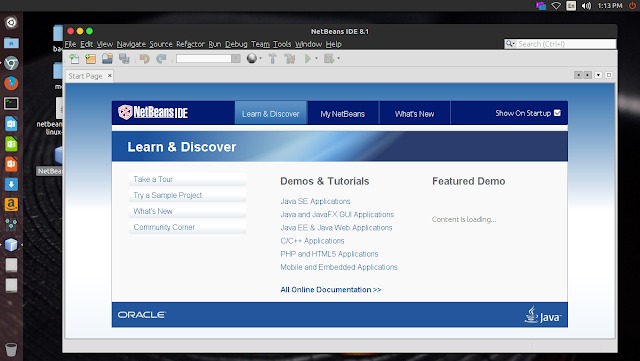
In older version NetBeans default uninstall location was /usr/local/netbeansxxxx
but in new versions they have changed installation locations actually, you can decide to which location to install
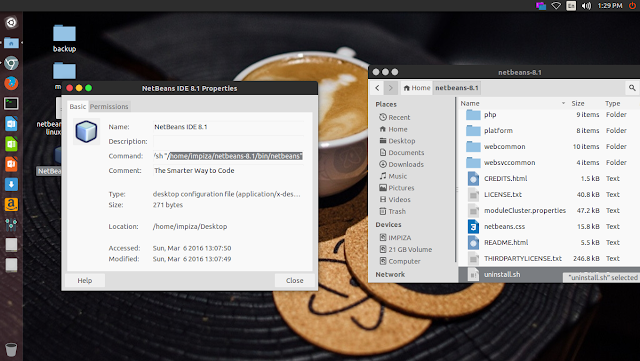
in new versions you can easily find the installed location just right click and checking properties of NetBeans Desktop icon
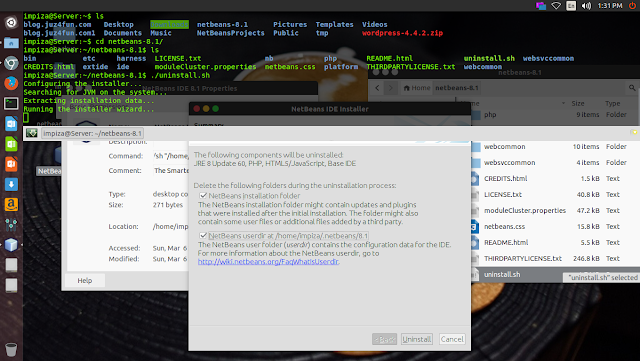
In my case i have installed it in my Home folder, i opened terminal,moved to installation location using cd /installation path
*change installation path to yours
In your terminal it will looks like this
type
press enter
uninstall
Enjoy.
by Rishi Giri | Aug 28, 2015 | JavaScript, Programming
Choosing a JavaScript Framework .
Which JavaScript Framework will be best for you? Let us try to answer what you actually need. Because, in the end, it’s not only about JavaScript Frameworks.
It becomes very difficult for so many people when they try to choose a JavaScript Framework. But I think it’s more about framework vs. libraries. Using a framework may lead to a lock-in where as a library based approach yields more flexibility. Don’t get me wrong. Frameworks are great in that they solve a lot of common concerns. This is just great for prototyping and development up to a point.
Frameworks Come with Boundaries
The problems begin as you start hitting the boundaries and go beyond what theframework was meant for. As the framework you are using gains new features you’ll likely want to keep your application up to date. This incurs some cost and may lead to bigger refactoring at worst.
Libraries Are More Flexible
In a library based approach (say React + some router + some data solution) you can be more flexible. As technologies come and go you can upgrade portions of your application as you want. There’s no need for big upheavals. Instead you set the pace. Say if a better router comes up you can replace that specific portion without having to disrupt the rest of the application.
Both Approaches Are Valid
Both approaches have their merits. I don’t expect frameworks to go anywhere. I do believe a library based approach is a little underappreciated at the moment. It does require more legwork and it comes with more technical challenge when you are starting. But the flexibility it yields may just be worth it. But as I said, it depends on the context.