by Teffin Varghese | Jul 20, 2020 | Howtos, Linux, Networking, News, OS, Review
NVMe over Fabrics
The performance of storage technology increased 100 times in the last 5 years.
with the introduction if flash based solid state drives SSD’s especially SSD’s connected over NVMe Non volatile memory express is a specification which enables a SSD to take advantage of high speed peripheral component interconnect express PCIe bus in the computer by connecting directly into it.
As the performance of the storage gets faster, the network wire speed and protocols become the bottleneck we can speed up the wires with the latest Ethernet and Inifiniband speeds. But without faster protocol technologies these new SSD’s and NVMe technologies will have their performance locked up inside the server.
NVMe over Fabrics NVMe-oF is an exciting networking storage technology. allowing you to take full advantages of SSD’s performance across ether net or Infiniband networks. NVMe-oF is designed to leverage the performance of NVMe technology across the network using RDMA (remote direct memory access) RDMA enables data in memory to transfer between computers and storage devices across the network with little to no CPU usage.
NVMe over fabrics technology enables.
1, Extremely high bandwidth.
2, Low fabric latency.
3, Scalability, management and storage fault isolation.
4, Better utilization of the storage, rack-space and power.
5, Sharing storage across multiple servers.
6, Compute and storage can be disconnected from each other or dis-aggregated.
NVMe-oF is the perfect technology to fill the recent performance gap between storage and storage network technology
Cheers!!!
by Teffin Varghese | Jul 16, 2020 | Howtos, Networking, News, OS, Security, Servers, Storages, Troubleshooting

Step 1: Identify the Adapter model
===========================
You can use the lspci command to view the details of the Adapter.
[root@localhost ~]# lspci | grep Mellanox
a1:00.0 Infiniband controller: Mellanox Technologies MT28908 Family [ConnectX-6]
Here our Adapter is Mellanox Technologies MT28908 Family [ConnectX-6]
Step 2: Download the OFED driver for the Adapter.
===================================================================================
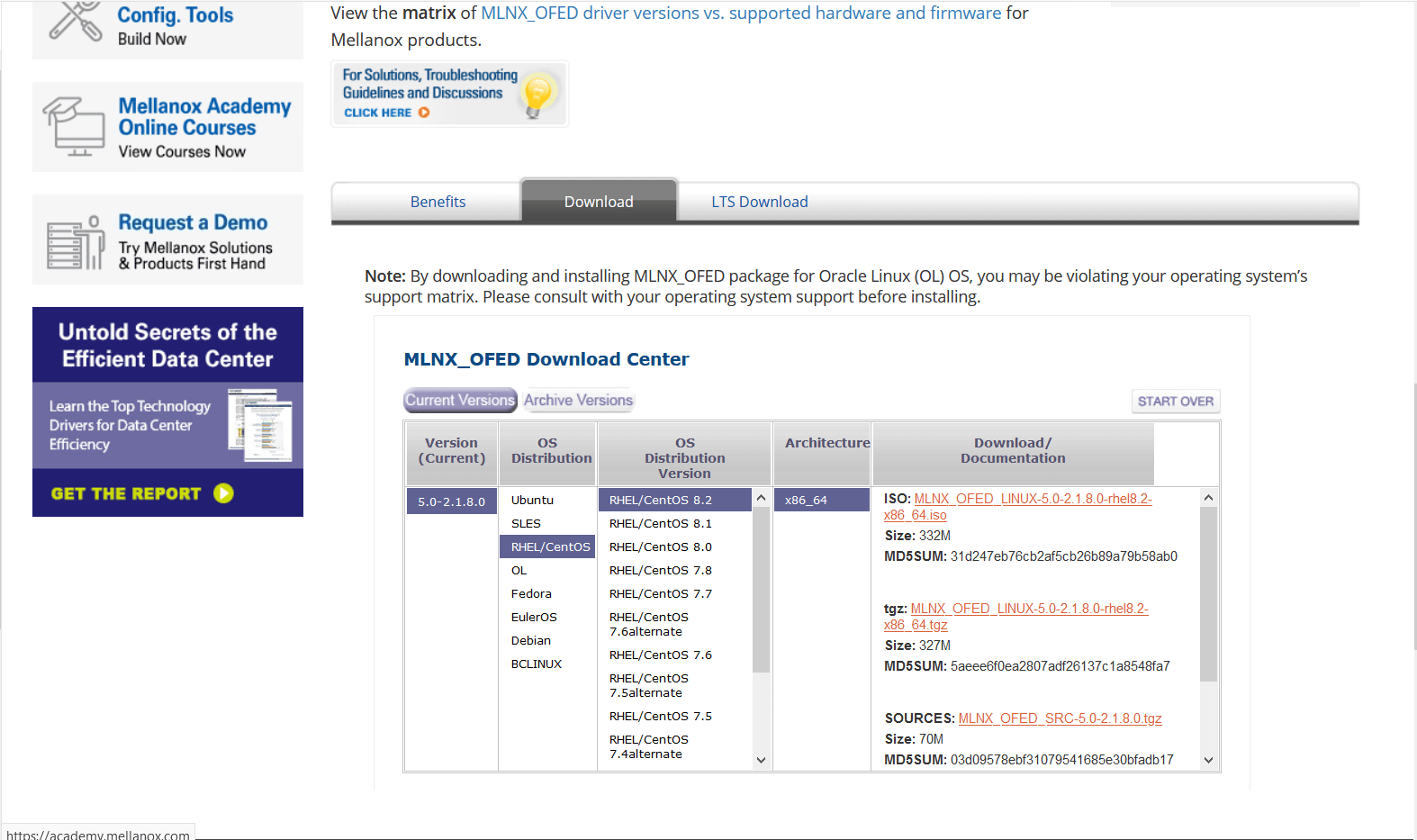
You can download the OFED driver from the below link and choose the OS and select the tar file for download.
https://www.mellanox.com/products/infiniband-drivers/linux/mlnx_ofed
https://www.mellanox.com/products/infiniband-drivers/linux/mlnx_ofed
You can use wget command to download the driver.
Example: wget http://content.mellanox.com/ofed/MLNX_OFED-5.0-2.1.8.0/MLNX_OFED_LINUX-5.0-2.1.8.0-rhel8.2-x86_64.tgz
http://content.mellanox.com/ofed/MLNX_OFED-5.0-2.1.8.0/MLNX_OFED_LINUX-5.0-2.1.8.0-rhel8.2-x86_64.tgz
Step 3: Extract the zip file.
============================================
Untar the zip file you have just downloaded
Example: tar -xvf MLNX_OFED_LINUX-5.0-2.1.8.0-rhel8.2-x86_64.tgz
Step 4: Navigate to the extracted directory.
======================================================================
Once you have extracted the tar file you can view a directory with the same name, navigate to the directory
by cd command
Example: cd MLNX_OFED_LINUX-5.0-2.1.8.0-rhel8.2-x86_64
Once you are in the directory please list the contents on the directory using a ls command.
and from the output you can view a script file name “mlnxofedinstall”
Step 5: Run the script file.
==========================================
You can run the script file using “./mlnxofedinstall”
Once you run the script the driver will be installed and once it is completed reload the driver or reboot the machine.
Note: The server must have Perl, python and GCC compilers for completing the driver installation.
If the installation run failed due to any unmet dependencies, please install the packages and libraries mentioned on the failed message.
Firmware upgrade.
————————–
Once the OFED driver is successfully installed then you can go with the firmware upgrade.
We are using the tool MSTFLINT for performing the firmware upgrade.
Step 1: First we need to identify the PCI bus ID of the adapter.
===========================================================================
Run “lspci | grep Mellanox” to determine the PCI bus ID
Example: [root@localhost ~]# lspci | grep Mellanox
a1:00.0 Infiniband controller: Mellanox Technologies MT28908 Family [ConnectX-6]
Here “a1:00.0” is our PCI bus ID.
Step 2: Download and unzip the Firmware Zip file.
=============================================================
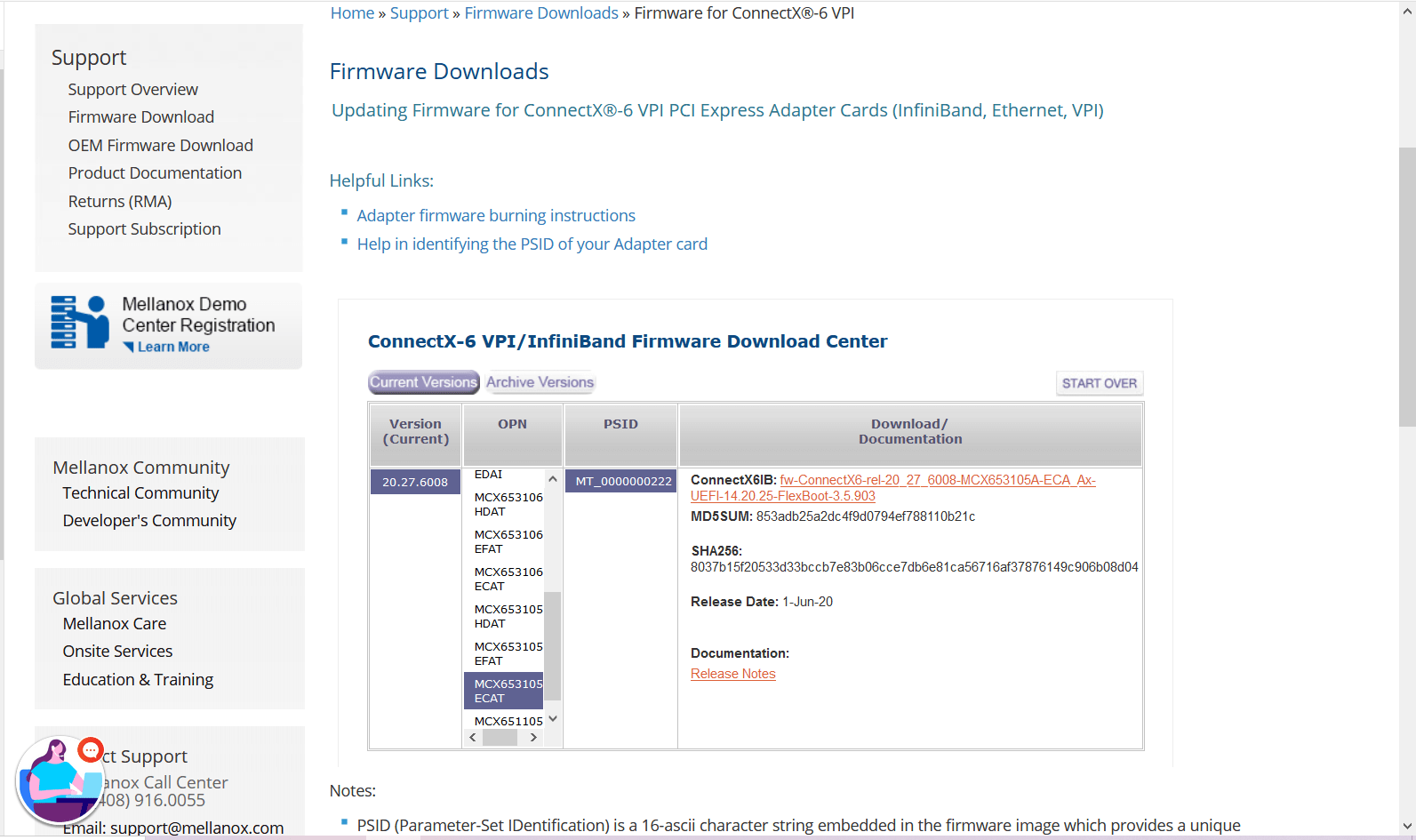
You can download the firmware from the official Mellanox website.
Link: https://www.mellanox.com/support/firmware/connectx6ib
https://www.mellanox.com/support/firmware/connectx6ib
Please download the firmware using “wget”
Example: wget http://www.mellanox.com/downloads/firmware/fw-ConnectX6-rel-20_27_6008-MCX653105A-ECA_Ax-UEFI-14.20.25-FlexBoot-3.5.903.bin.zip
http://www.mellanox.com/downloads/firmware/fw-ConnectX6-rel-20_27_6008-MCX653105A-ECA_Ax-UEFI-14.20.25-FlexBoot-3.5.903.bin.zip
Once it is downloaded unzip it by using the command “unzip”
Example: unzip fw-ConnectX6-rel-20_27_6008-MCX653105A-ECA_Ax-UEFI-14.20.25-FlexBoot-3.5.903.bin.zip
Once you unzip the file you can view a .bin file which is our firmware.
Example: fw-ConnectX6-rel-20_27_6008-MCX653105A-ECA_Ax-UEFI-14.20.25-FlexBoot-3.5.903.bin
Step3: Burn the firmware to the NIC.
============================================
You need the mstflint utility to update the firmware. You can download mstflint from the OpenFabrics site at mstflint_SW for Linux.
NOTE: If OFED is installed on your machine, then mstflint is already installed.
For burning the new firmware run
the command in the same directory as the firmware file, run “mstflint –d <PCI bus ID, i.e. 05:00.0> -i <.bin file> b”
Example: mstflint -d a1:00.0 -i fw-ConnectX6-rel-20_27_6008-MCX653105A-ECA_Ax-UEFI-14.20.25-FlexBoot-3.5.903.bin b
To load new FW run mstfwreset or reboot machine and check.
Example: [root@localhost ~]# ethtool -i ib0
driver: mlx5_core[ib_ipoib]
version: 5.0-2.1.8
firmware-version: 20.27.6008 (MT_0000000222)
expansion-rom-version:
bus-info: 0000:a1:00.0
supports-statistics: yes
supports-test: yes
supports-eeprom-access: no
supports-register-dump: no
supports-priv-flags: yes
Here “ib0” is our interface name, yours maybe different.
Please refer Mellanox documentation if you need any further details.
https://www.mellanox.com/products/adapter-software/firmware-tools https://www.mellanox.com/support/firmware/update-instructions
by Teffin Varghese | Jul 12, 2020 | Howtos, Networking, News
Hello there, We all may have access to internet by one-way or another. Although you may be living in an on area with limited providers or network speeds. Improving the network speeds will improve everything from entertainment to work to education and health care.
But 41% of the world does not have access to internet at all.
And that’s were SpaceX comes in with Starlink which is very close to launching their service.

And we are trying to address the below three questions.
what is it.
what are the least developments.
why should we even care.
Starlink is a satellite constellation being constructed by SpaceX to provide satellite Internet access.
The constellation will consist of thousands of mass-produced small satellites in low Earth orbit (LEO), working in combination with ground transceivers.
SpaceX also plans to sell some of the satellites for military, scientific, or exploratory purposes.
The SpaceX satellite development facility in Redmond, Washington houses the Starlink research, development, manufacturing, and on-orbit control operations.
The total cost of the decade-long project to design, build, and deploy the constellation was estimated by SpaceX in May 2018 to be about US $10 billion.
So as I mentioned just over 40% of the world does not have any access to the internet yet and even in areas with access it can be limited if you are not in the urban area.
Places like Africa the Middle East and Asia are lagging behind areas like North America and Europe.
Laying long cables into remote regions can be costly than the number of potential customers even building a wireless signals in those areas are costly which is why there are so many low bandwidth areas across the world.
96% of the urban areas have access to broadband only 61% of the rural areas do.
Satellite internet program can solve that problem because you can cover large area with a single satellite but there are some big downsides.
Current satellite based internet services are using geostationary satellites that are orbiting over 35000 KM above the surface of the earth its that distances creating the first major problem. Latency a radio signal takes 120 mill seconds to reach Geo stationary satellite and another 120 mill second to relay that sound back to ground. So in theory we looking at latency of 240 mill seconds but in practice we can see around 400 to 600 mill seconds, 12 times slower than what we see on the ground and then we have another challenge how much bandwidth a single satellite can handle which can affect the download and upload speed of everyone sharing that satellite. Which is your maximum download and upload speed will be most likely on the lower side. And also you may have some data caps to content with each month that’s mean there is a huge opening for competition that’s where SpaceX comes with Starlink.

Since we have already satellite internet and what’s make Starlink different.
It’s a low earth orbiting constellation of satellites operates at 1 third to one one hundred of the height of the Geo stationary satellites
As of April 22nd 2020 there are 420 satellites under Starlink constellation so far and most of them are deployed around are 550 KM above the earth.
They tend to launch 60 satellite per Falcon 9 flight so total around 4400 satellites on phase one and another 7500 in phase 2.
So around the year 2027 they nearly have 12000 satellites deployed in three orbital shells.
This not guarantee that SpaceX also submitted paper work for additional 13000 satellites beyond that.
So why so many satellites.
Well low earth orbital satellites much closer to earth means they can be stationary they have to move faster to maintain their orbit and also they have smaller count of coverage.
But big benefit of much closer is much lower latency for communication. Latency here is 20 to 35 mill seconds. which make them comparable with cable and fiber optics networks.
However when using lasers to communicate with satellites which Starlink will eventually do it will get a little physics boost.
light travel 40% faster in vacuum than in glass like a fiber optic cable and each satellite will be able to handle 1 Tb/s which is 4 times the capacity if vsat.
that is roughly 40000 people streaming 4k video at once. all that sounds incredible isn’t it a service that meant to knock out all the current internet services.
No the service is meant to be a smaller segment of the market with primarily areas that are less populated.

With tens of thousands of satellite being put into orbit it’s going to dwarf everything that comes before.
At this point of history we only launch about 9000 objects in the space and of those less than 6000 of them are in still use today, SpaceX is going to triple that number in 5 to 7 years. And if they move forward with the additional 13000 then you may know why lot of people are concerned about over crowding and space debris.
SpaceX have strict plan to mitigate space debris. which means a high level of de-orbiting reliability than NASA uses for itself. that is 90% of the satellite is successfully de-orbiting.
With the targeted life span of 3 to 5 years, space x confirms that implement an operations plan for the orderly de-orbit of satellites nearing the end of their
useful lives at a rate far faster than is required under international standards.
And SpaceX satellites will de-orbit by moving to a disposal orbit from which they will reenter the Earth’s atmosphere within approximately one year
after completion of their mission.
About 95% of the satellite parts will disintegrate while entering the atmosphere as they de-orbit.
There is also been an impact on astronomical observation, the satellite will very visible when they deployed
and they will be noticeable while they tumbling their way to their orbit.
Astronomers are worried about the light pollution.
SpaceX address these issues with painting their satellite black to reduce the reflection.

There is a huge opportunity for a company to up and running first. Which is obviously looking like is SpaceX.
In 2018 they estimated the total cost will be about 10 billion dollars. Which is a lofty price tag for only expected to make 3 to 5 billion dollars a year by launches from 2025.
The projection from lead revenue from Starlink are 30 to 50 billion dollars a year by 2025.
On a media call the very first launch of a satellite Elon said.
“We see this as a way for SpaceX to generate revenue that can be used to develop more and more advanced rockets and spaceships. We believe we can use the revenue from Starlink to fund Starship.”
Which leads right into their goal to become a multi planetary species.
The Starlink beta testing is planning to start in North America and Europe in august 2020.
when more satellites are add into the constellation we can see more area under the beta program.
It interest how it’s going to perform within the next year or two and what opportunities its opens in internet access and other business.
by Teffin Varghese | Jul 7, 2020 | Howtos, Linux, Networking, OS, Python, Security, Servers, Storages, Troubleshooting, Uncategorized, VMware Esxi, Workstation
How to upgrade 10G Intel NIC driver in Linux.
Step 1: Identify the NIC adapter on the server/machine.
For upgrading the NIC driver, First you need to identify the NIC model for that you can use “lspci” command.
Use the command “lspci | grep -i net” to list the PCIe devices. (Usually 10G NIC’s are plugged into the PCIe slots on the Motherboard)
Command: lspci | grep -i net
Sample Output:
04:00.0 Ethernet controller: Intel Corporation 82599ES 10-Gigabit SFI/SFP+ Network Connection (rev 01)
04:00.1 Ethernet controller: Intel Corporation 82599ES 10-Gigabit SFI/SFP+ Network Connection (rev 01)
06:00.0 Ethernet controller: Intel Corporation 82576 Gigabit Network Connection (rev 01)
06:00.1 Ethernet controller: Intel Corporation 82576 Gigabit Network Connection (rev 01)
Here our 10G adapter is Ethernet controller: Intel Corporation 82599ES 10-Gigabit SFI/SFP+ Network Connection (rev 01)
Step 2: Identify the active interface in the OS.
For identify the active interface just type “ip a” on the terminal, this will display the interfaces on the OS and from the list identify the active interface name.
Command: ip a
Sample Output:
1: lo: <LOOPBACK,UP,LOWER_UP> mtu 65536 qdisc noqueue state UNKNOWN
link/loopback 00:00:00:00:00:00 brd 00:00:00:00:00:00
inet 127.0.0.1/8 scope host lo
inet6 ::1/128 scope host
valid_lft forever preferred_lft forever
2: eth0: <BROADCAST,MULTICAST,UP,LOWER_UP> mtu 1500 qdisc pfifo_fast state UP qlen 1000
link/ether 32:36:65:64:66:34 brd ff:ff:ff:ff:ff:ff
inet x.x.x.x/x brd 50.7.126.127 scope global eth0
inet6 x:x:x::x/64 scope global
valid_lft forever preferred_lft forever
inet6 x::x:x:x:x/64 scope link
valid_lft forever preferred_lft forever
Step 3: Check the current driver version of the NIC.
For identifying the driver version use the command “ethtool -i <interface name>” Eg: ethool -i eth0
From the results you can view the current driver version. The output will be something like this.
Command: ethtool -i <interface name>
Sample Output:
driver: ixgbe
version: 4.2.1-k
firmware-version: 0x80000208
bus-info: 0000:04:00.0
supports-statistics: yes
supports-test: yes
supports-eeprom-access: yes
supports-register-dump: yes
supports-priv-flags: no
Here the “version: 4.2.1-k” indicates the current driver version of the NIC.
Step 4: Download the latest available driver from Intel.
Go to https://downloadcenter.intel.com/product/32609/Intel-82599-10-Gigabit-Ethernet-Controller
to download the required driver.
https://downloadcenter.intel.com/product/32609/Intel-82599-10-Gigabit-Ethernet-Controller
For Linux: https://downloadcenter.intel.com/download/14687/Ethernet-Intel-Network-Adapter-Driver-for-PCIe-Intel-10-Gigabit-Ethernet-Network-Connections-Under-Linux-?product=32609
https://downloadcenter.intel.com/download/14687/Ethernet-Intel-Network-Adapter-Driver-for-PCIe-Intel-10-Gigabit-Ethernet-Network-Connections-Under-Linux-?product=32609
Download the latest available driver from the above link.
Step 5: Install/upgrade the Driver.
To manually build the driver
—————————-
1. Move the base driver tar file to the directory of your choice.
For example, use ‘/home/username/ixgbe’ or ‘/usr/local/src/ixgbe’.
2. Untar/unzip the archive, where <x.x.x> is the version number for the
driver tar file:
# tar zxf ixgbe-<x.x.x>.tar.gz
3. Change to the driver src directory, where <x.x.x> is the version number
for the driver tar:
# cd ixgbe-<x.x.x>/src/
4. Compile the driver module:
# make install
The binary will be installed as:
/lib/modules/<KERNEL VER>/updates/drivers/net/ethernet/intel/ixgbe/ixgbe.ko
The install location listed above is the default location. This may differ
for various Linux distributions.
5. Load the module using the modprobe command.
To check the version of the driver and then load it:
# modinfo ixgbe
# modprobe ixgbe [parameter=port1_value,port2_value]
Alternately, make sure that any older ixgbe drivers are removed from the
kernel before loading the new module:
# rmmod ixgbe; modprobe ixgbe
Note: For certain distributions like (but not limited to) Red Hat Enterprise
Linux 7 and Ubuntu, once the driver is installed, you may need to update the
initrd/initramfs file to prevent the OS loading old versions of the ixgbe
driver.
Use the dracut utility on Red Hat distributions:
# dracut –force
For Ubuntu:
# update-initramfs -u
Step 6: Check and verify the new driver version.
Use the same command we used before “ethtool -i <interface name>” to view the driver version
Command: ethtool -i <interface name>
Sample Output:
driver: ixgbe
version: 5.7.1-k
firmware-version: 0x80000208
bus-info: 0000:04:00.0
supports-statistics: yes
supports-test: yes
supports-eeprom-access: yes
supports-register-dump: yes
supports-priv-flags: no
Note: Please read the read me file available from Intel before proceeding.
That’s all for now. CHEERS!!!
by Teffin Varghese | Dec 18, 2019 | Hosting, Howtos, Linux, News, OS, Servers, VPS, Windows

What ever kind of applications that you are running it's pretty certain that you are going to need severs, Sometimes you need larger ones, Some time you need smaller ones, Sometimes you need one and sometimes you need thousands of them.
What if your requirement, you need to obtain services quickly and inexpensively? Traditionally provisioning servers can be time consuming and it could takes many days or weeks. You have to research into the right kind of hardware to buy and need to purchase the hardware, have it racked and stacked and eventually get access to your servers and once you purchase the servers you stuck with them.
Amazon Elastic Compute Cloud (EC2) makes it easy for you to obtain virtual servers also known as compute instances in the cloud quickly and inexpensively. You simply choose the instance type you want, the template you are going to use, the templates are based on Windows or Linux and launch the quantity you are going to need. You can do this by few clicks from the AWS management console or automate the process by APK using and SDK in your choice of language and within minuted your instances will be running and you have access full administrator control just like any other server and with Amazon EC2 you only pay for your use. Once you done with the instance, Stop them and you stop paying for them.
Amazon EC2 provides you different ranges of instance type design for different use-cases, these range from small and economical instances that are great for low volume applications, all the way up to cluster compute instances run for high performance compute workload and cloud based super-computing on demand.
Amazon EC2 provides instance optimized for compute, memory, storage and GPU processing enable you to find the right price and performance combinations for what ever workloads you want to run. It's also really easy to resize your instances if your business or applications requirement change, Amazon EC2 offers a choice of flexible pricing options with on demand pricing you only pay for what you use, When you stop your instances you stop paying. There are no long term commitments or upfront fees. Reserved instance pricing lets you obtain a significant discount over the on demand pricing return for a low one time payment. Spot instance pricing lets you name the price that you want to pay for the instances using marketplace pricing and allow you to obtain compute capacity at significant discount than the on-demand price.
Amazon knows the security is very important for your applications and Amazon EC2 provides a number of built in security features your instances located on a virtual private cloud or a VPC, that is logically isolated network that you control. Amazon VPC provides you with a number of network security tools that you can use to control that who can access your instances. You can also connects securely to your on premises network with hardware based VPN device.
Amazon EC2 instances provides you various amount of directly attached temporary storage depends on instance type and you can also use Amazon Elastic Block store or EBS to provide persistent block storage fop your Amazon EC2 instances. Amazon EBS also offers you to the ability to provision storage with the specific level of performance to meets the needs of your application. They can be difficult to predict the demand of your application might experience an Amazon EC2 provides auto-scaling o help insure your applications demand are met Also auto-scaling lets you to define metrics increase or decrease the number of instances that you are running.
You can use standard metrics such as network,Bandwidth or CPU utilization with the custom metric you designed. This help you insure that you can meet your application demand with only pay for what you use.

by Teffin Varghese | Dec 17, 2019 | Howtos, Linux, News, OS, Servers, Windows

AWS
AWS is the most comprehensive and widely adapted cloud platform. Millions of customers trust AWS to power their infrastructure and applications. Organizations that every type and size using AWS to lower cost,become more agile and innovate faster. AWS provides on demand delivery of technology services via internet with pay as you go pricing. You can use this services to build and run virtually any type of application without upfront cost and ongoing commitments. You only pay for what you use.
AWS gives you more services and more features within those services with any other cloud provider this makes faster,easier and most cost effective to moving your existing applications to the cloud and build anything you can imagine. For infrastructure technologies like compute,storage and databases to emerging technologies like machine learning,AI,DATA LAKES and Analytics and IoT.
Building on AWS means you can choose the right tool for the job. Eg WAS offers the wide availability of databases that purpose build for different types of applications. With AWS you can leverage the latest technology to experiment and innovate more quickly.
AWS are continually exhilarating the phase of innovation to invent entirely new technologies we can use to transform our business. Like pioneering the serverless computing phase by the launch of AWS lambda which lets developer run their code without provisioning or managing servers. And AWS build Amazon sage maker a fully managed machine learning service that powers everyday developers and scientists that use machine learning without any previous experience.
AWS is constantly expanding their global network of AWS regions, So you can access AWS services to build and run applications anywhere on the world. Each of these regions have multiple availability zones that are physically separated from each other, and connected through low latency high through put and highly redundant networking this make it easy to design and develop applications that are scalable, fault tolerance and highly available.
AWS infrastructure is build to satisfy the security standards of the most risk sensitive organizations. You have so access to the AWS partner network which has thousands of system integrator who are specialized in AWS services and hundred and thousands of independent software vendors who adapted technology to work on AWS with the largest community of customers across every industry AWS has unmatched experience and operational expertise you can depend on for your most important applications and every imaginable use cases.
Some of the most used AWS services are…
1,EC2 Services.
2,RDS
3,VPC
4,Route 53
5,Load Balancer.
