by George Sruthin | Aug 3, 2020 | Hosting, Howtos, Security, Servers, VPN, VPS
For creating a VPN you will need these things.
- A VPS(Virtual Private Server), I am using Ubuntu-based VPS
Here is the link for a free credit of 100$ with this you can create a VPS for free and test it if you like then you can continue.
Then you will need
- ssh client Since I am using Linux for this demo I will be using remmina, or you can use a terminal.
- Outline Manager and Outline Client ( I am using Outline as a VPN server, it's opensource and free.) here is the link to outline website https://getoutline.org/
Your content goes here. Edit or remove this text inline or in the module Content settings. You can also style every aspect of this content in the module Design settings and even apply custom CSS to this text in the module Advanced settings.
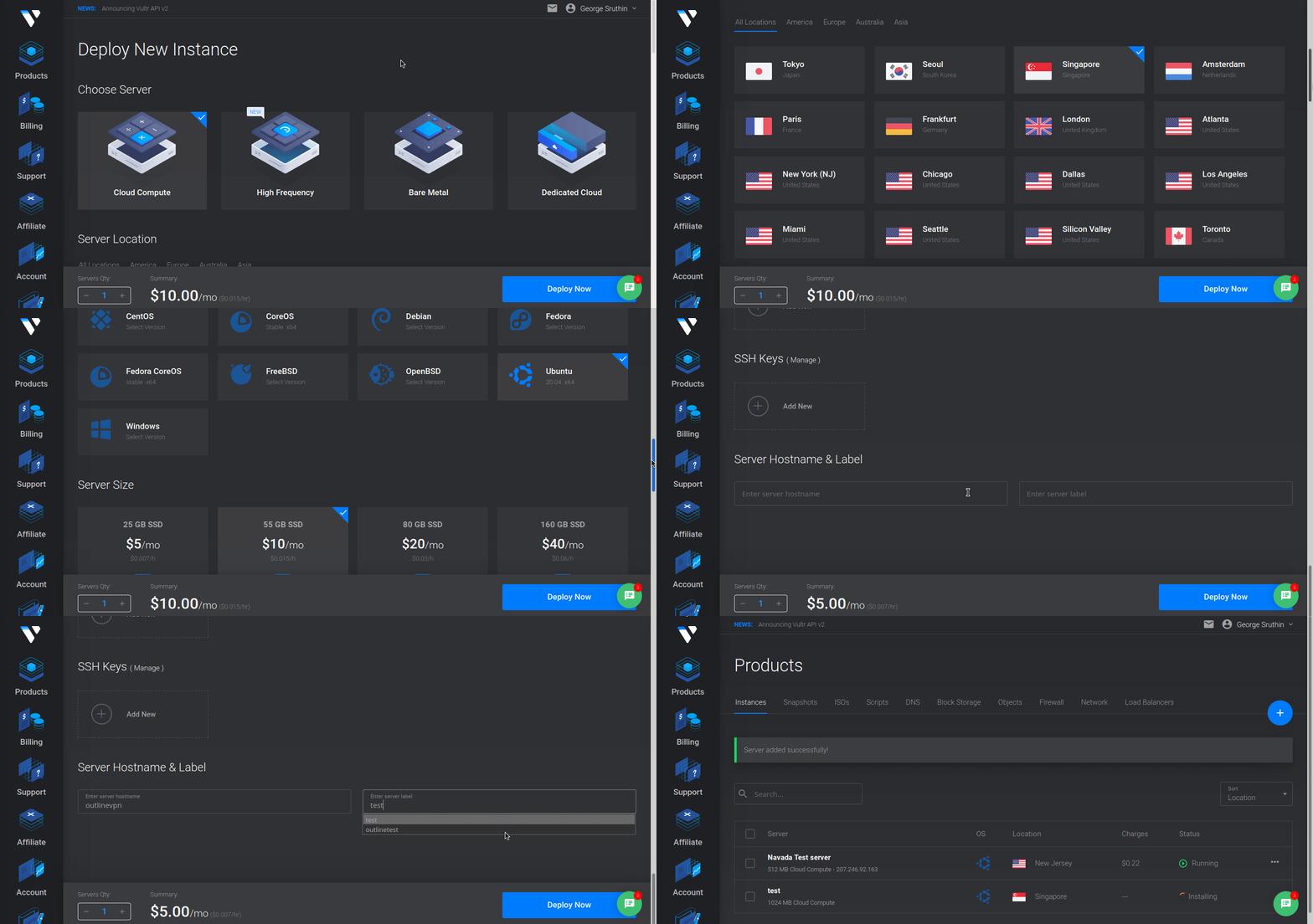
Ok, Let's get started, first create a VPS server, register your account and deploy your VPS server, i am using Vultr as VPS hosting provider, they have multiple datacenters in multiple continent.
after creating account on Vultr, you need to go to products, Click plus icon and click on create new server, this will redirect your page and follow below steps. wait for some time till your new vps server is up and running.
after that you will get your new VPS server listed in your product section, then open it now you can see, server detail including your server IP, user name, password. etc.
you need to note down 3 things,
- Server IP
- username
- password
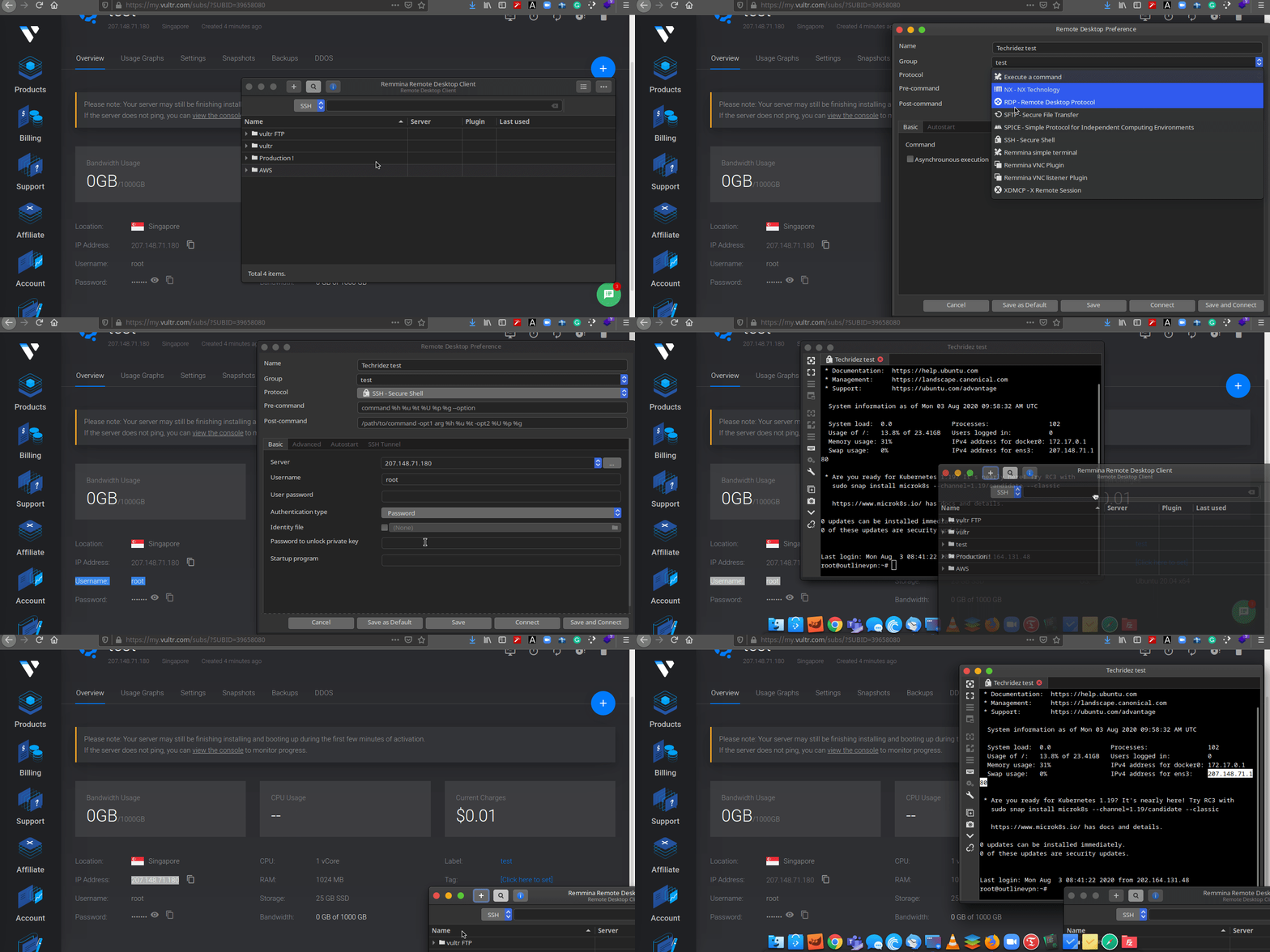
now you have open your ssh client and connect to your VPS server.
i will put a link here how you can do that.
after connecting to your VPS, first thing you need to do is update & upgrade your server if available. please follow this command to update and upgrade.
for update use this command
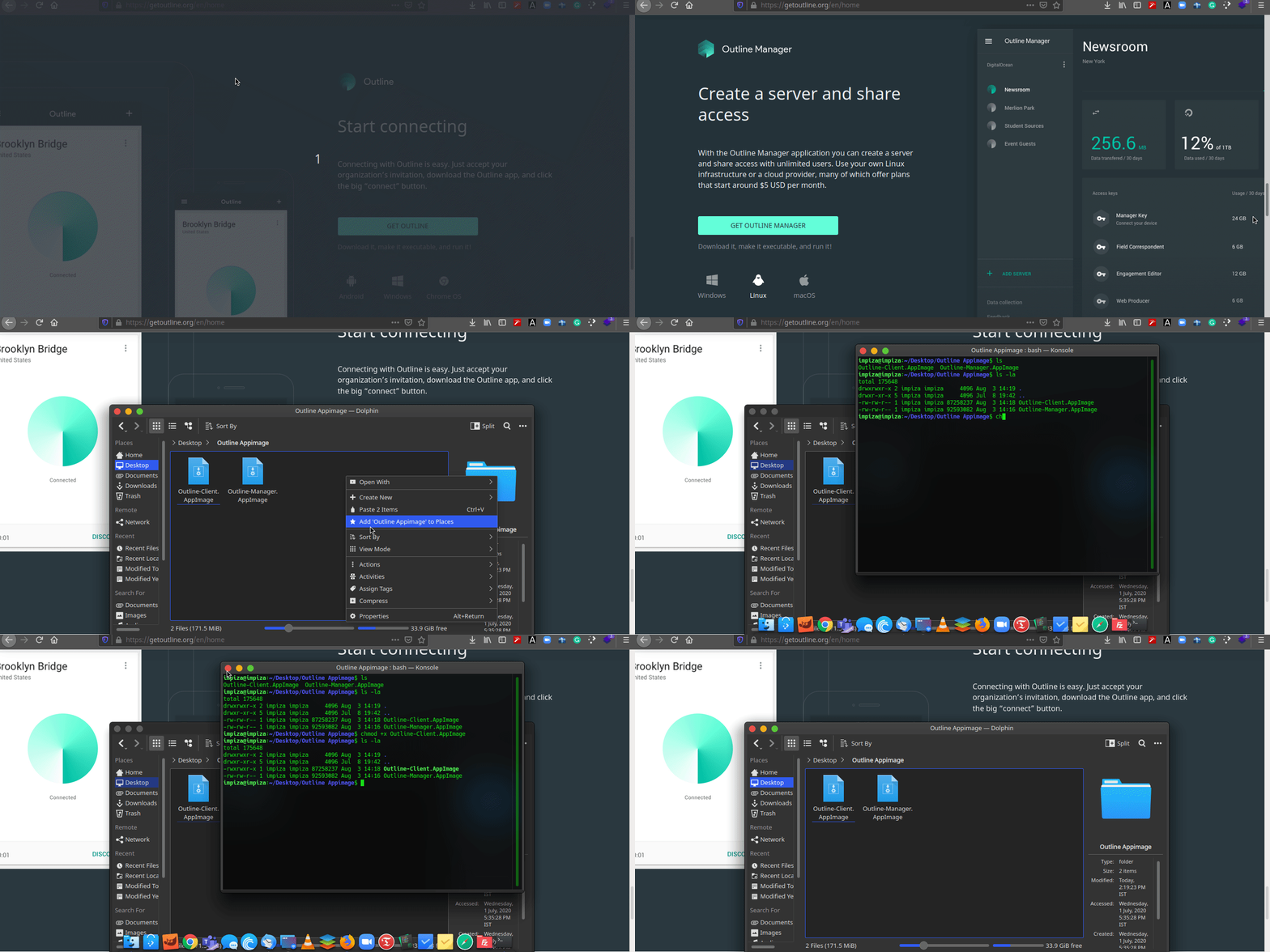
then restart reconnect to your server, then go to outline VPN website and download outline manager and outline client. and move both files to a directory so that you can find that files easily. then make those files executable. i will give you detailed tutorial below. there is gui method also available its depends on the distro you are using.
https://techridez.com/blog/make-file-executable-using-terminal/
Ok now open Outline-Manager.Appimage
since its already executable you just need to double click.
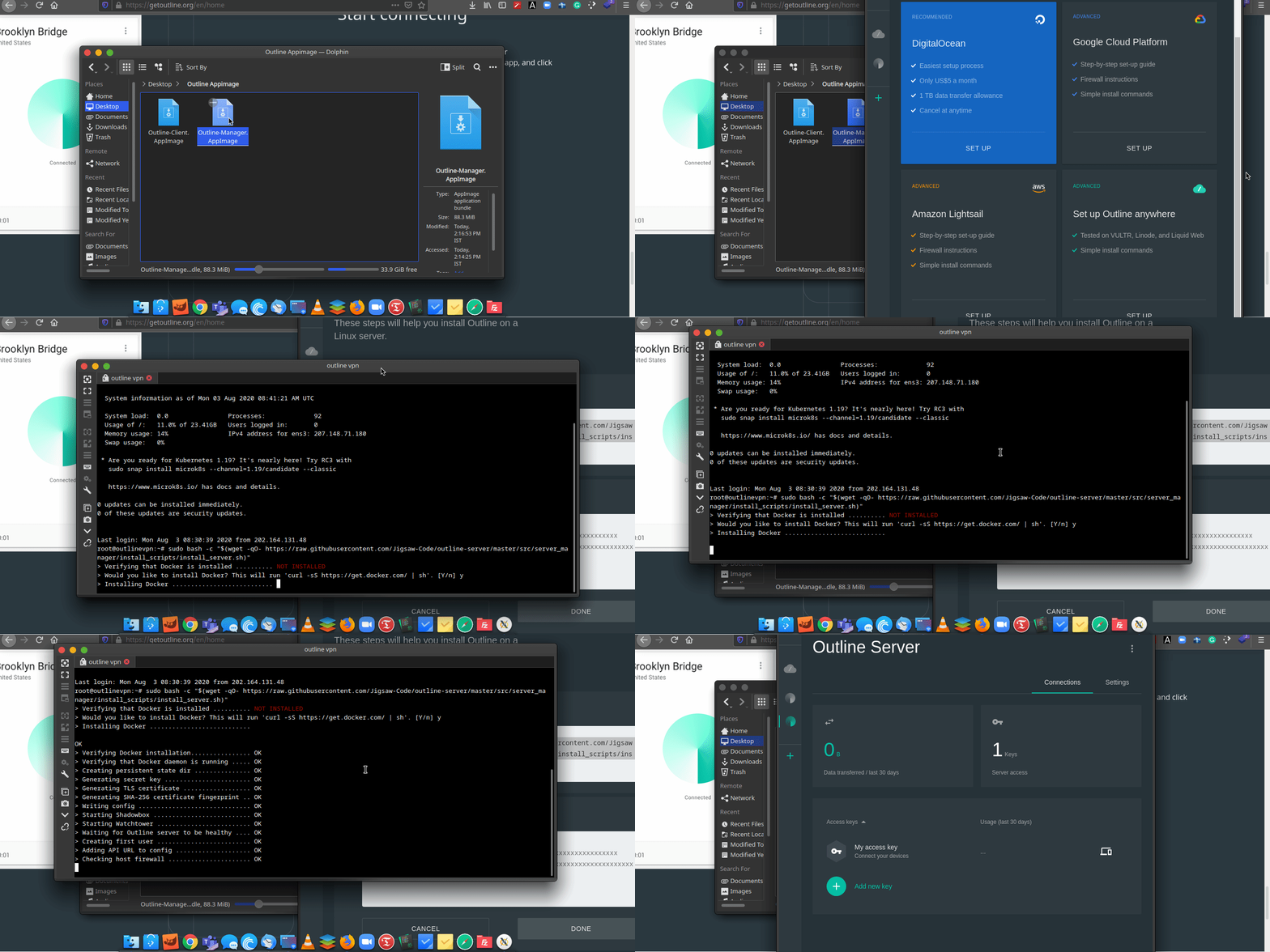
it will open Outline Manager, and you can find 4 options.
- Digital Ocean
- Google Cloud
- Aws Cloud
- Advanced option.
we will use Advanced option. this will give you a command line, you need to copy that and paste in the ssh client which is connected VPS server.
as you can see from above, after pasting those command to VPS Server it will install docker, it will takes some time, after that you will get API key as output which is highlighted in green, copy that and paste it in field in the Outline Manager.
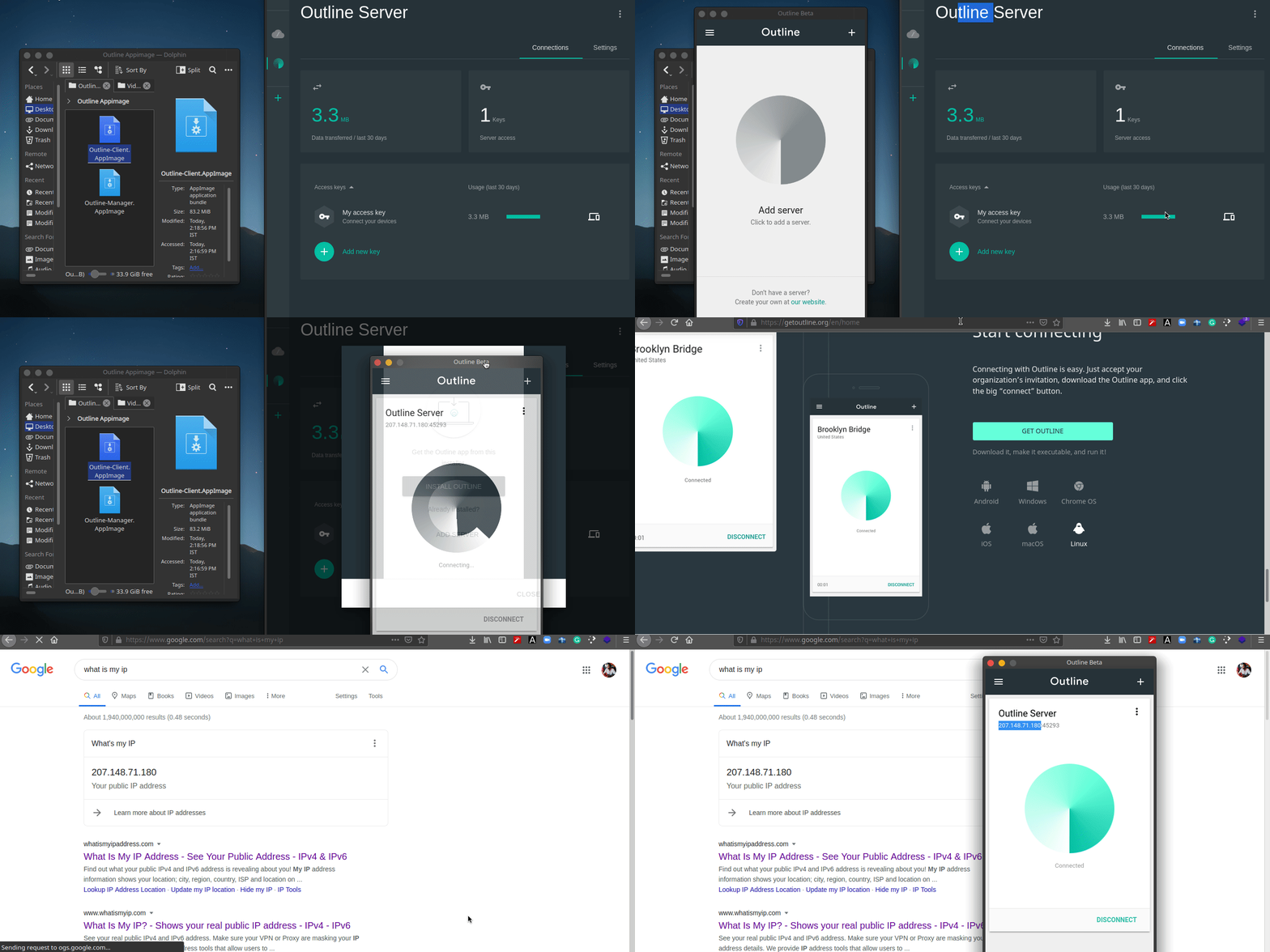
then open outline client, go to outline manager copy key, and add server to the client.
Now your VPN Client is ready. as you can see about my public ip is also changed to the vps serve we are using.
Enjoy.
If you want a details video please watch my youtube channel. also i have put the youtube video below
by George Sruthin | Aug 3, 2020 | Hosting, Howtos, Linux, Servers, VPS
Remmina is a remote desktop client for POSIX-based computer operating systems. It supports the Remote Desktop Protocol, VNC, NX, XDMCP, SPICE and SSH protocols.
Open Remmina Remote Desktop Client then click on plus button, give a name, group name(this is not important, but if you give a group name then later you can find those with in a folder or a group this is useful)
Then change protocol to SSH
then find tab called Basic and fill
Server : IP Address, User name & Password. now save and connect.
by Teffin Varghese | Dec 18, 2019 | Hosting, Howtos, Linux, News, OS, Servers, VPS, Windows

What ever kind of applications that you are running it's pretty certain that you are going to need severs, Sometimes you need larger ones, Some time you need smaller ones, Sometimes you need one and sometimes you need thousands of them.
What if your requirement, you need to obtain services quickly and inexpensively? Traditionally provisioning servers can be time consuming and it could takes many days or weeks. You have to research into the right kind of hardware to buy and need to purchase the hardware, have it racked and stacked and eventually get access to your servers and once you purchase the servers you stuck with them.
Amazon Elastic Compute Cloud (EC2) makes it easy for you to obtain virtual servers also known as compute instances in the cloud quickly and inexpensively. You simply choose the instance type you want, the template you are going to use, the templates are based on Windows or Linux and launch the quantity you are going to need. You can do this by few clicks from the AWS management console or automate the process by APK using and SDK in your choice of language and within minuted your instances will be running and you have access full administrator control just like any other server and with Amazon EC2 you only pay for your use. Once you done with the instance, Stop them and you stop paying for them.
Amazon EC2 provides you different ranges of instance type design for different use-cases, these range from small and economical instances that are great for low volume applications, all the way up to cluster compute instances run for high performance compute workload and cloud based super-computing on demand.
Amazon EC2 provides instance optimized for compute, memory, storage and GPU processing enable you to find the right price and performance combinations for what ever workloads you want to run. It's also really easy to resize your instances if your business or applications requirement change, Amazon EC2 offers a choice of flexible pricing options with on demand pricing you only pay for what you use, When you stop your instances you stop paying. There are no long term commitments or upfront fees. Reserved instance pricing lets you obtain a significant discount over the on demand pricing return for a low one time payment. Spot instance pricing lets you name the price that you want to pay for the instances using marketplace pricing and allow you to obtain compute capacity at significant discount than the on-demand price.
Amazon knows the security is very important for your applications and Amazon EC2 provides a number of built in security features your instances located on a virtual private cloud or a VPC, that is logically isolated network that you control. Amazon VPC provides you with a number of network security tools that you can use to control that who can access your instances. You can also connects securely to your on premises network with hardware based VPN device.
Amazon EC2 instances provides you various amount of directly attached temporary storage depends on instance type and you can also use Amazon Elastic Block store or EBS to provide persistent block storage fop your Amazon EC2 instances. Amazon EBS also offers you to the ability to provision storage with the specific level of performance to meets the needs of your application. They can be difficult to predict the demand of your application might experience an Amazon EC2 provides auto-scaling o help insure your applications demand are met Also auto-scaling lets you to define metrics increase or decrease the number of instances that you are running.
You can use standard metrics such as network,Bandwidth or CPU utilization with the custom metric you designed. This help you insure that you can meet your application demand with only pay for what you use.

by Teffin Varghese | Dec 13, 2019 | Hosting, Linux, Networking, Review, Servers, VMware Esxi, Windows
What is Cloud Computing?

Cloud computing is an on demand delivery of IT resources via the internet with pay as you go pricing instead of buying and owning and maintaining physical data-centers and servers. You access technology service such as computing power,storage and databases on as needed basis from a cloud provider like AWS,AZURE,Google Cloud etc.
Organizations of every type and size industry are using the cloud for a wide verity of use-cases such as data backup, disaster recovery,email,virtual desktops,Software development and testing,big data analytics and customer facing web applications. For example the health care companies are using the cloud to develop more personalize treatment for patients. Financial services companies are using the cloud to power real time fraud detection and prevention and video-game makers are using the cloud to deliver online games to millions of players around the globe.
With cloud computing your business can be more agile,reduce cost,instantly scaled and deployed globally in minutes. Cloud computing provides you instant access to broad range of technologies that you can innovate-faster and build nearly anything like infrastructure services to compute,storage and databases to IoT to machine learning,data analytics and much more.
You can deploy technology services in a matter of minutes and get from idea to implementation several orders of magnitude faster than before. This gives you the freedom to experiment and test new ideas to differentiate customer experience and transform your business,Such as adding machine learning and intelligence to your applications in order to personalize your experience to your customers and improve their engagement.
You don’t need to make large upfront investments in hardware and overpay for capacity you don’t use, Instead you can use trade capital expense for variable expense and only pay for IT when you consumes it. With cloud computing you access resource from the cloud in real-time as they needed. You can scale these new resources up and down to grow and shrink capacity instantly as your business changed. Cloud computing also make it easy to expand to new regions and apply globally in minutes. For example AWS has infrastructure all around the world.Putting applications to closer proximity to end users reduced latency and improve their experiences.
No matter your location, size and industry the cloud frees you managing infrastructure and data-centers, So you can focus on what matters the most to your business.