by George Sruthin | Apr 16, 2015 | Howtos, Linux
![]()
first you need to uninstall existing firefox !
impiza@impiza-desktop ~ $ sudo autoremove firefox
then type this command in a terminal to add repository to system
impiza@impiza-desktop ~ $ sudo add-apt-repository ppa:ubuntu-mozilla-daily/firefox-aurora
then update your system
impiza@impiza-desktop ~ $ sudo apt-get update
then install firefox
this will install firefox Developer Edition (Aurora)
impiza@impiza-desktop ~ $ sudo apt-get install firefox
by George Sruthin | Jan 26, 2015 | Howtos, OS, Servers, VMware Esxi
How to add Custom Drivers to VMware Esxi iso image !
Hi friends once i have try to install VMware Esxi in my old pc . but it failed because absence of network driver in it , so i have to customise Esxi image and add driver to it
For this you will need ESXi-Customizer
Download from this link
used this driver vmware-bootbank-net-r8168.vib
Run ESXi-Customizer-v2.7.2 as Admin
This will extract to a folder open it and run “ESXi-Customizer.cmd ” as Admin
Brwose VMware.iso
Browse Destination
Browse Driver
Browse VMware.iso
Run
Enjoy
by George Sruthin | Dec 19, 2014 | Howtos, Linux, OS, Servers, Troubleshooting
Some of you may experience this error in your life if you are using linux .it happens when previous installation fails , here is the screenshot which is happened in my Linux Distro
E: Could not get lock /var/lib/dpkg/lock – open (11: Resource temporarily unavailable)
E: Unable to lock the administration directory (/var/lib/dpkg/), is another process using it?
its very easy to fix this error just type following commands in your terminal
sudo rm /var/lib/dpkg/lock
this will delete the “lock” directory in /var/lib/dpkg/
after that you can install what ever you want
by George Sruthin | Dec 13, 2014 | Howtos, Linux
How to fix Virtual Device error in Skype in linux
all audio devices detects as “Virtual Device”
in this case my Skype Version is 4.3.0.37
4.2 version also have this issue
this is occur because your system don’t have libpulse0:i386 package ! all you need is to install the package to fix the issue
now open up your terminal , type following command line
sudo apt-get install libpulse0:i386
type your password and press enter
press y and press enter to begin installation of package
after installation , quit Skype and relaunch ,
go to Skype ==Options ==Sound Devices == and check , now you can find PulseAudio detects
Check your Skype with Sound Test Service
go to Skype ==Options ==Sound Devices ==Make a test call
by George Sruthin | Nov 30, 2014 | Howtos, OS, Servers, Troubleshooting, Windows
Enabling .Net Framework 3.5 in Windows Server 2012 using Command prompt
You need
- Media of Windows Server 2012
insert your media in your dvd drive or mound it via iLo or pendrive
please not your drive letter which is assigned to that media
now open up your command prompt
press windows key and R key same time now run windows will appear , now type CMD then press enter
this will open your command prompt
now mound your drive letter
in this case my drive letter is ” D “
so i need to type D: in the command prompt
now type following command
dism /online /enable-feature /featurename:NetFx3 /All /Source:d:/sources/sxs
Note* in command line letter d may vary
now wait for some time
done !
lets check on server manager
restart your server
by George Sruthin | Nov 20, 2014 | Howtos, Servers
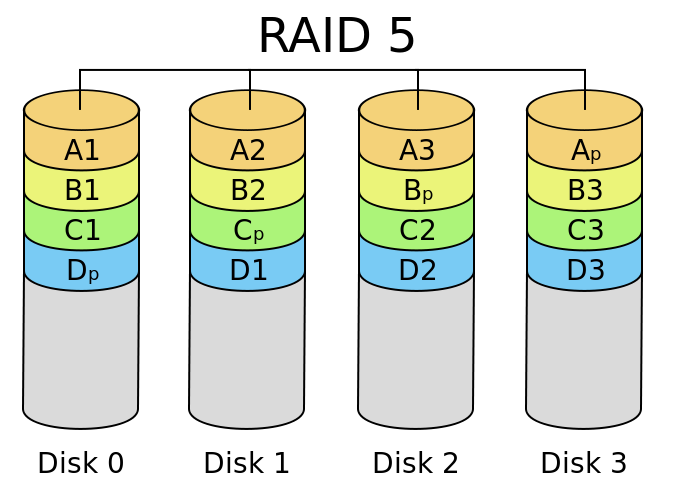
What is RAID 5
f
A RAID 5 comprises block-level striping with distributed parity. Unlike in RAID 4, parity information is distributed among the drives. It requires that all drives but one be present to operate. Upon failure of a single drive, subsequent reads can be calculated from the distributed parity such that no data is lost. RAID 5 requires at least three disks.
In comparison to RAID 4, RAID 5’s distributed parity evens out the stress of a dedicated parity disk among all RAID members. Additionally, read performance is increased since all RAID members participate in serving of the read requests.
Diagram of a RAID 5 setup with distributed parity with each color representing the group of blocks in the respective parity block (a stripe). This diagram shows left asymmetric algorithm
HOT SPARE
A
hot spare disk is a disk or group of disks used to automatically or manually, depending upon the hot spare policy, replace a failing or failed disk in a RAID configuration.
The hot spare disk reduces the mean time to recovery (MTTR) for the RAID redundancy group, thus reducing the probability of a second disk failure and the resultant data loss that would occur in any singly redundant RAID (e.g., RAID-1, RAID-5, RAID-10). Typically, a hot spare is available to replace a number of different disks and systems employing a hot spare normally require a redundant group to allow time for the data to be generated onto the spare disk. During this time the system is exposed to data loss due to a subsequent failure, and therefore the automatic switching to a spare disk reduces the time of exposure to that risk compared to manual discovery and implementation.
The concept of hot spares is not limited to hardware, but also software systems can be held in a state of readiness, for example a database server may have a software copy on hot standby, possibly even on the same machine to cope with the various factors that make a database unreliable, such as the impact of disc failure, poorly written queries or database software errors.