Select Page

How to enable 3rd party apps in Mac os x Mountain Lion

open up System Preferences from Dock or Launcher
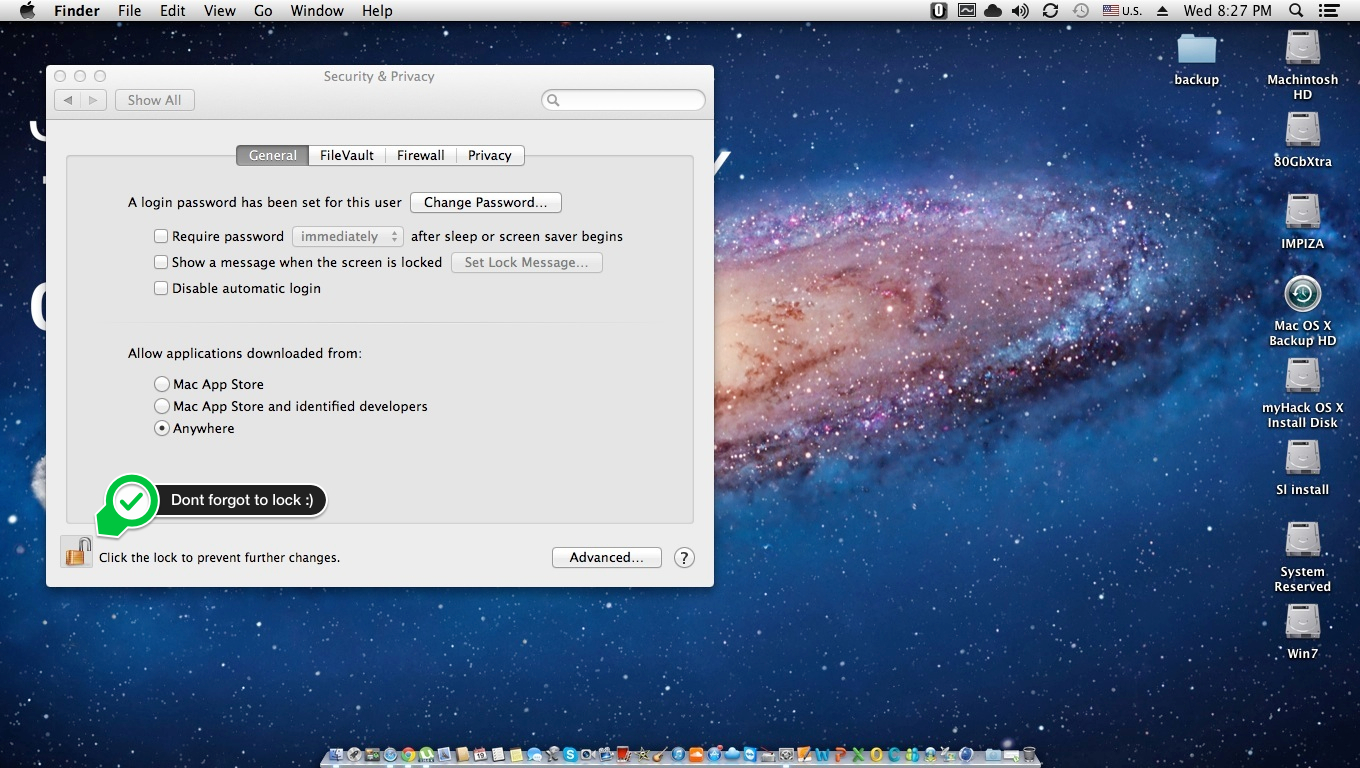
Then open security & Privacy 
Click lock icon on left corner of Security & Privacy Window 
Now it will ask your admin Password to grand access 
“System Preferences is trying to unlock security & Privacy preferences. Type your password to allow this “
type your password in the box and click unlock 
Now you can see a section called “Allow application download from :”

  1. Mac App Store
  2. Mac App Store and identified developers
  3. Anywhere
by default it will be 2. Mac App Store and identified developers 
you have to change it to 3. Anywhere 
now a small drop down window will appear for confirmation 
click “Allow From Anywhere”
now unlock icon again to lock window 
Done ๐Ÿ™‚ 

Here Video

Done ๐Ÿ™‚

HP Notebook PCs – WWAN Module Remains Off After Upgrading to Windows 8

WLAN Card  remains off, after upgrading to windows 8 ?


Description ! 

Wireless Wide Area Network is in off state after upgrading the computer to Windows 8.  !


Solution ! 

 Simply load the BIOS defaults and it should take care of the issue.  !


Information in this document applies to the following:
Systems:
  • HP EliteBook 2170p Notebook PC
  • HP EliteBook 2560p Notebook PC
  • HP EliteBook 2760p Tablet PC
  • HP EliteBook 8460p Notebook PC
  • HP EliteBook 8460w Mobile Workstation
  • HP EliteBook 8470p Notebook PC
  • HP EliteBook 8560p Notebook PC
  • HP EliteBook 8560w Mobile Workstation
  • HP EliteBook 8570p Notebook PC
  • HP EliteBook 8570w Mobile Workstation
  • HP EliteBook 8760w Mobile Workstation
  • HP EliteBook 8770w Mobile Workstation
  • HP EliteBook Folio 9470m Notebook PC
  • HP ProBook 2570p Notebook PC
  • HP ProBook 6460b Notebook PC
  • HP ProBook 6470b Notebook PC
  • HP ProBook 6560b Notebook PC
  • HP ProBook 6570b Notebook PC
Resolution

Follow the steps provided to resolve this issue.

  1. Start the computer.
  2. Press the F10 key to enter the BIOS setup
  3. Select Restore Defaults
  4. Under Load Defaults , Select Yes . 
  5. Choose Save Changes and Exit .
  6. Under Save Changes and Exit , Choose Yes .

How to add start button to Windows 8

Bored with Windows 8 Metro style start menu ?
want to add Windows xp , 7 like Start menu in Win 8
install classic shell to get your START button Back on Windows 8 OS

open up this url in your browser http://www.classicshell.net/

download and install latest files then 

after installing go to start button, right click ..  select “settings” on the pop-up form, select “all settings”


done ! 


different styles 


Windows classic style
Windows XP style 

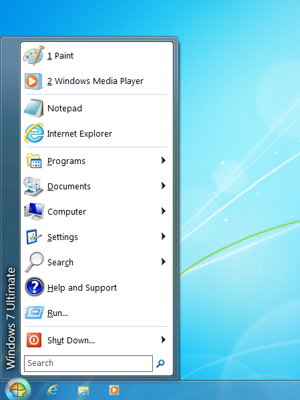
Windows 7 Style 

This website also provide Windows 7 Classic explorer styles 


System Requirements


Classic Shell works on Windows Vista , Windows 7 , Windows 8 , Windows Server 2008, Windows Server 2008 R2 , and Windows Server 2012 , Both 32 and 64 Bit Versions are supported (the same installer works for both)


enjoy ๐Ÿ™‚

HP Slate 7 (HP’s first android tablet)

HP announced the HP Slate7, an affordable Android Jelly Bean consumer tablet that provides customers with easy access to Google Mobile services.

With a 7-inch diagonal screen and weighing 13 ounces, the HP Slate7 is an ideal trusted personal companion, featuring a stainless-steel frame and soft black paint in gray or red on the back. It also is the industry’s first tablet to offer embedded Beats Audio, for the best-sounding, richest audio experience available on a tablet.


Powered by an ARM Dual Core Cortex-A9 1.6 GHz processor, the HP Slate7 is fast and responsive. Integrated wireless allows customers to access email, the internet and key applications, while the High-aperture-ratio Field Fringe Switching (HFFS) panel offers wide viewing angles that provide easy viewing of documents, games, photos and videosโ€”even in outdoor lighting conditions.
The HP Slate7 includes a 3-megapixel camera on the back and a VGA camera on the front for chatting, videos and photos.
With the HP ePrint  application, customers can easily print while at home or on the go, and the exclusive native printing capability enables customers to print directly from most applications. A micro USB port allows customers to easily transfer files, and a suite of applications from HP spans exclusive games to productivity tools.
HP will provide an array of simple and easy-to-access support tools and resources to help customers take full advantage of all of the features the HP Slate7 has to offer. In addition to extensive phone and online support offerings included with the HP Slate7, HP is offering customers the opportunity to add to the standard product limited warranty with its HP Care Pack services. HP Slate7 customers will have the option to protect their investment with a two-year HP Care Pack for $29 or a two-year HP Care Pack with Accidental Damage Protection (ADP) for $49


The HP Slate7 is expected to be available in the United States in April with a starting price of $169.



How to see passwords in Browser

     How to see passwords in Browser ?


yep you can see your or your friends password while typing or see saved password ! 

how ? 


i will add my video about this tutorial 

here i am posting my new tutorial about how to see password in safari , old one doesn’t have that info

Thanks for watching my tutorial , plz give your valuable comments and suggestions, share in your social media sites , and Click some ads ;D


Thanking you all in anticipation ! 

Pin It on Pinterest