
Ransomware attacks have become more sophisticated than ever. Today's attackers don't just encrypt production servers—they also target backup repositories, making recovery nearly impossible if your backups aren't properly protected.
That's why organizations are adopting the 3-2-1-1-0 backup strategy, combined with immutable backup repositories, to ensure they can recover quickly without paying a ransom.
In this article, I'll explain these backup best practices using Veeam Backup & Replication as a practical example. While the concepts discussed apply to any modern backup solution that supports immutable storage and secure backup architectures, Veeam provides an excellent reference for demonstrating how these best practices can be implemented in a real-world environment.
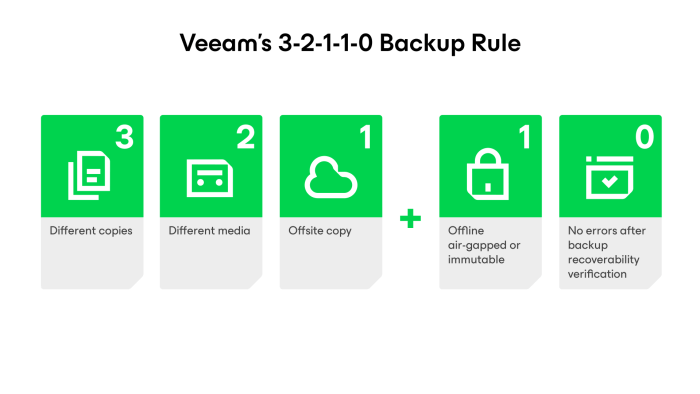
What is the 3-2-1-1-0 Backup Rule?
The 3-2-1-1-0 rule is considered the gold standard for backup protection.
| Rule | Meaning |
| 3 | Keep three copies of your data (production + two backups). |
|
2 |
Store backups on two different types of storage. |
| 1 | Keep one backup copy offsite. |
| 0 | Keep one backup copy immutable or offline. |
| 0 | Regularly verify backups to ensure zero restore errors. |
Following this strategy helps protect your business from hardware failures, accidental deletion, and ransomware attacks.
Why Traditional Backups Are No Longer Enough
Many organizations still rely on Windows file shares or NAS devices as backup repositories. While convenient, these repositories are often accessible to attackers if they compromise administrator credentials.
If ransomware can access your backup repository, it may encrypt or delete your backup files before attacking production systems.
This is why backup security is just as important as endpoint and network security.
What is an Immutable Backup?
An immutable backup cannot be modified or deleted until its retention period expires—even by an administrator.
This means that even if ransomware gains access to your backup server, your backup files remain protected.
Modern backup solutions like Veeam Backup & Replication support immutable repositories hosted on Linux, making them an excellent choice for ransomware protection.
Why Use a Linux Immutable Repository?
Linux repositories have become the preferred option for secure backups because they offer:
- Better protection against ransomware
- Lower attack surface than Windows
- Native support for immutable backup files
- High performance with filesystems like XFS
For Veeam users, a dedicated Linux repository is considered a best practice for protecting backup data.
Immutable Backup vs Air-Gapped Backup
Although often used together, they serve different purposes.
| Immutable Backup | Air-Gapped Backup |
| Always connected to the network | Completely disconnected from the network |
| Backup files cannot be modified or deleted | Backup media is physically isolated |
| Fast recovery | Maximum protection against cyberattacks |
For the best protection, maintain both an immutable backup repository for daily recovery and an air-gapped copy for disaster recovery.
Backup Best Practices
To build a ransomware-resilient backup environment:
- Follow the 3-2-1-1-0 backup rule
- Use a dedicated Linux immutable repository
- Keep one backup copy offsite
- Enable multi-factor authentication (MFA)
- Use separate administrator accounts for backup infrastructure
- Regularly test backup restores
- Monitor backup jobs and resolve failures promptly
- Keep your backup software and operating systems up to date
Final Thoughts
No security solution can guarantee complete protection from ransomware. However, a well-designed backup strategy ensures your business can recover quickly without paying a ransom.
By combining the 3-2-1-1-0 backup rule, Veeam immutable repositories, and air-gapped backups, organizations can significantly improve their cyber resilience and minimize downtime during an attack.
Investing in secure backups today is one of the smartest decisions you can make to protect your business tomorrow.