by George Sruthin | Sep 8, 2013 | Howtos
- open any one of your friends

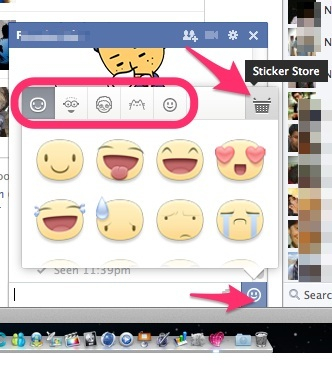
after open up chat window click on emotion icon (emoticon)
a smiley window will popup then select sticker store from there to add more stickers
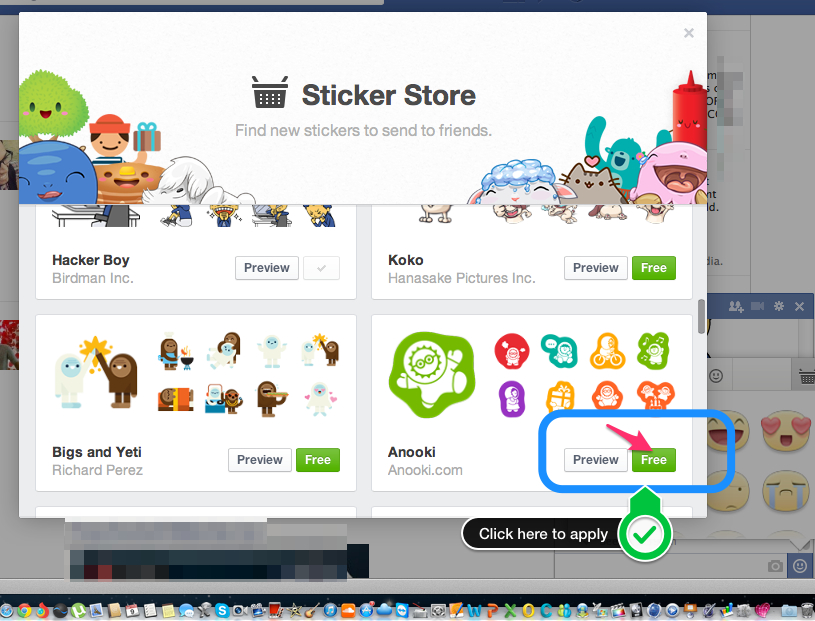
Now Sticker store will appear
scroll down to view all kind of stickers available
you can preview then by clicking icon called preview or
add then to your sticker gallery by clicking Free
now added stickers will appear in emoticon window !
enjoy 🙂
by George Sruthin | Aug 28, 2013 | Howtos, Windows
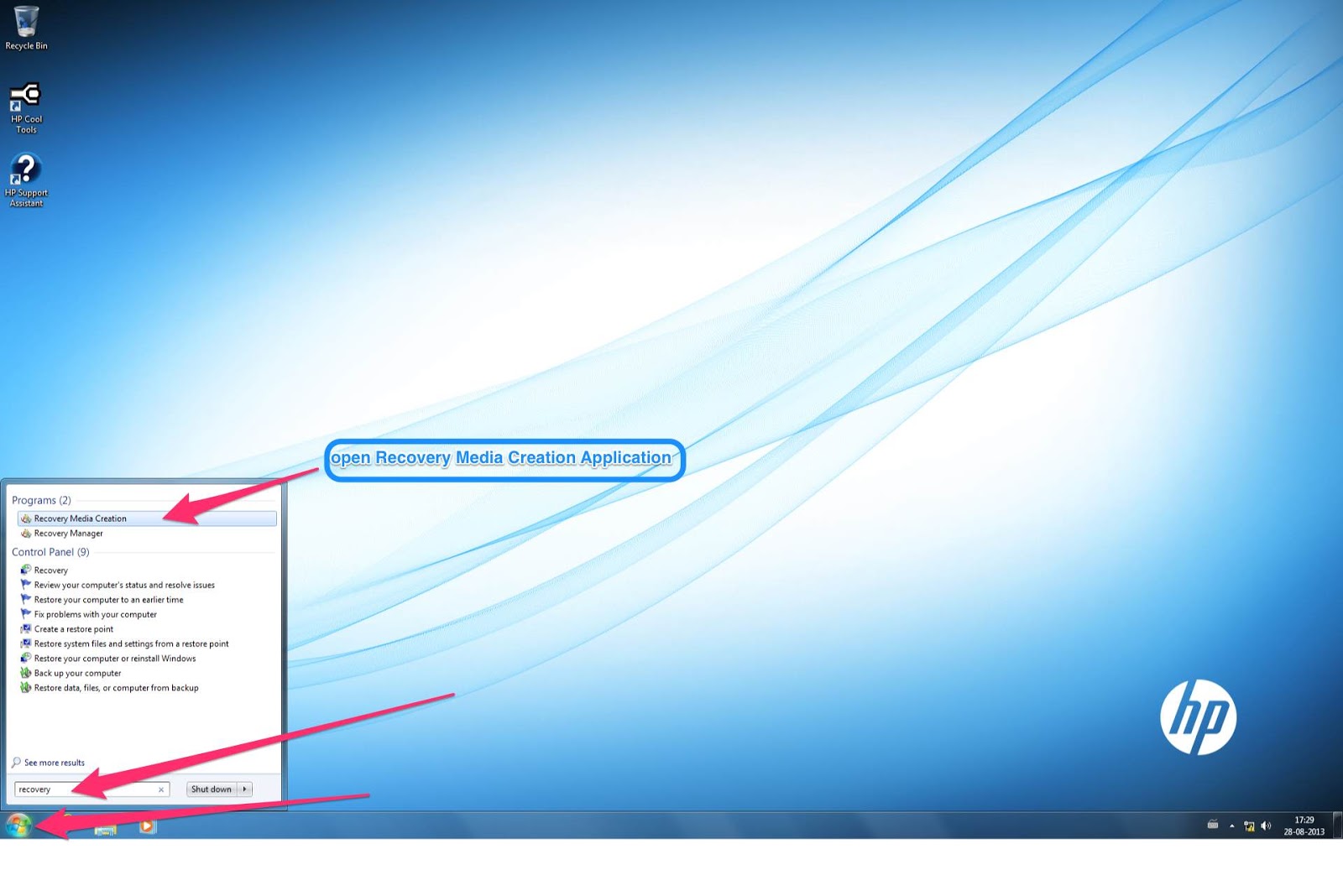
Open up Recovery Media Creation application from start
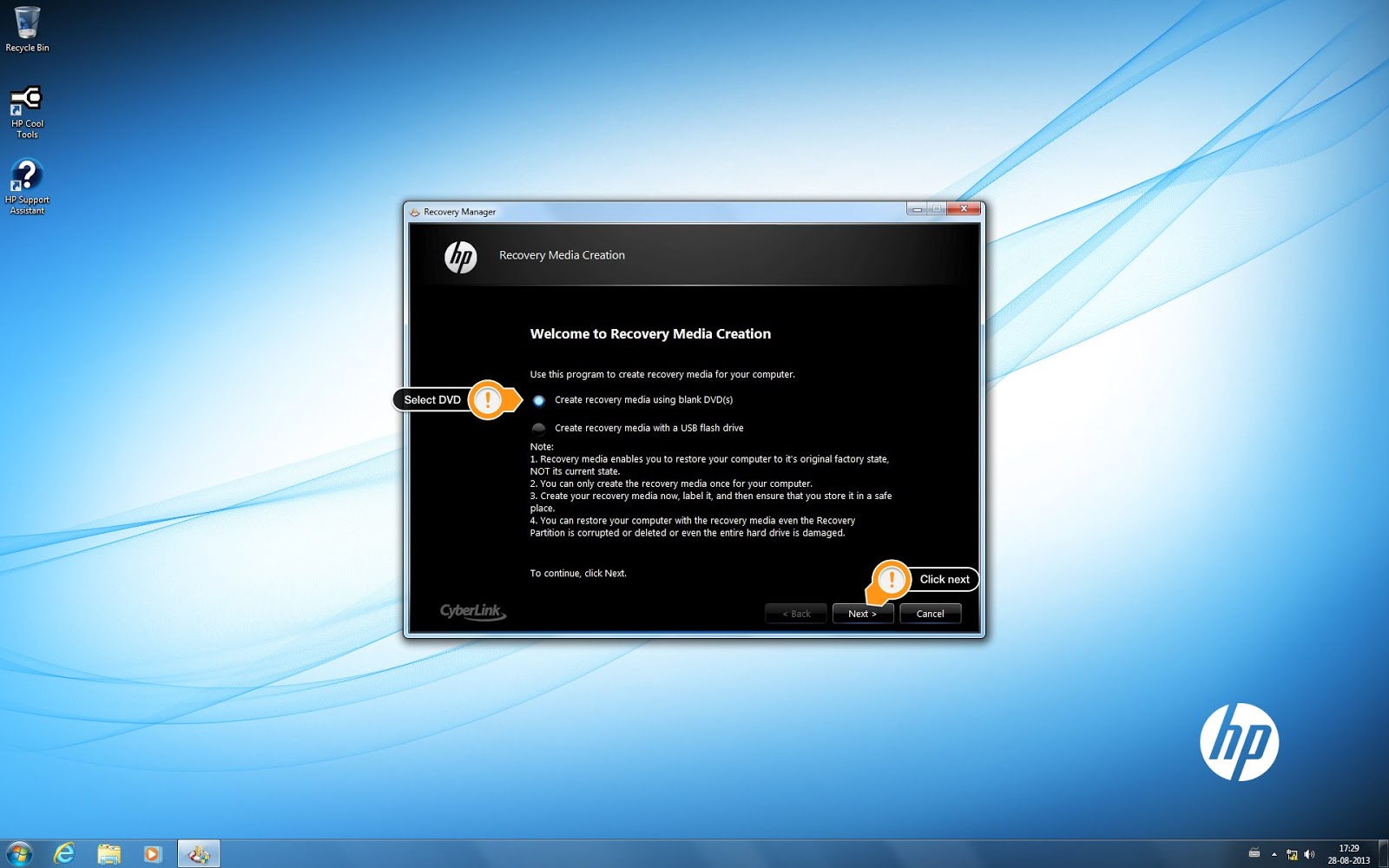
Select Create Recovery Media using blank DVD(s) ,click next
This window shows how many Discs you needed , insert blank dvd and click next
DVD must be DVD-R , You need approximately 4 blank DVD+R discs.(May vary) The Recovery Media Creation software program states how many discs are needed at the beginning of the process.Click next

after completing all 3 process click next
insert next disc
after completing all Discs click next
Congratulations You have Successfully created the recovery media
 NOTE:If Recovery Media Creation or Recovery Disc Creation is not available (grayed out), then a recovery image has already been created. Due to license restrictions, only one set of recovery media can be created. Any new recovery media must be ordered online or obtained using another method.
Video Tutorial
by George Sruthin | Jul 16, 2013 | Howtos, Windows
Hi friends here i am going to show you how to make a USB Bootable Pendrive to UPDATE BIOS
* i am using HP Bios files for this tutorial
Things you need !
Here we go ………
- Connect your pendrive to your pc
- Download your files (above mentioned )
- Extract all file to Desktop
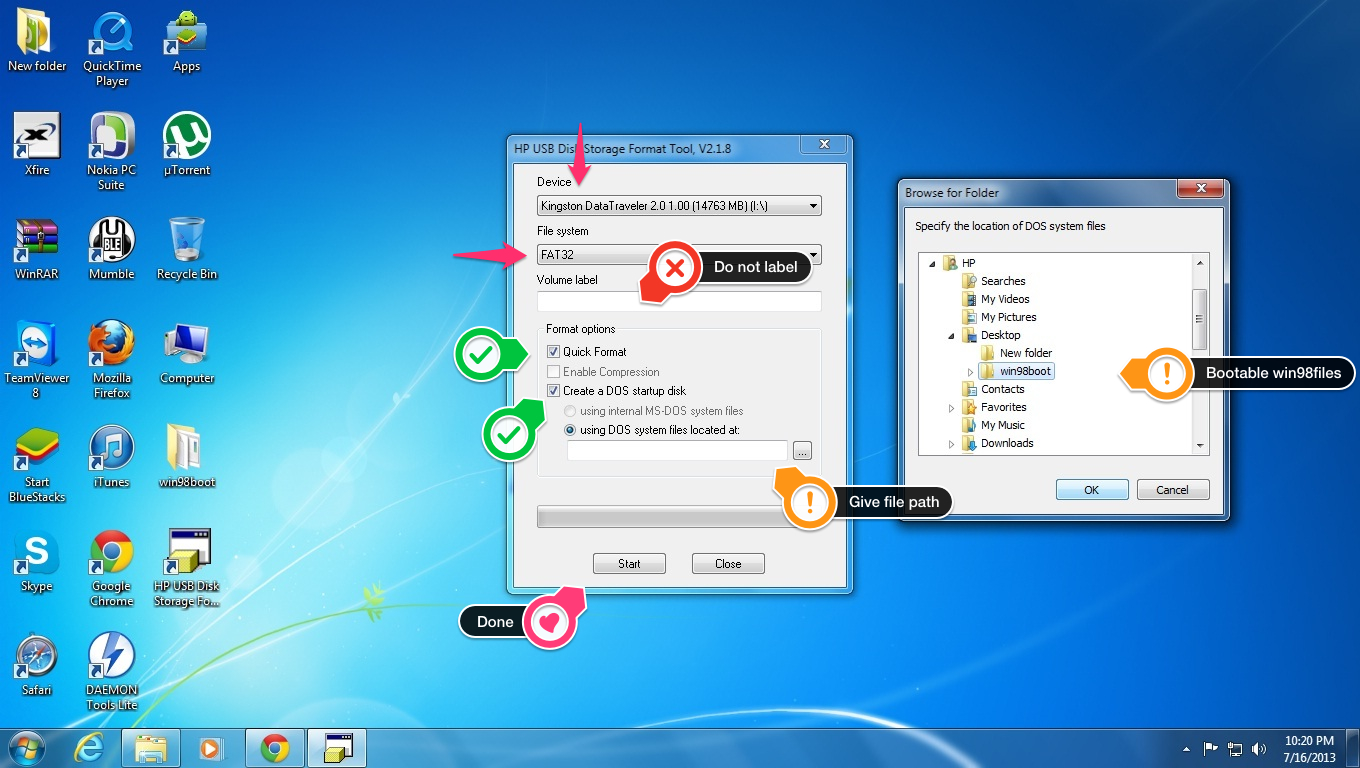
- Install HP USB Disk Format Tool V2.1.8 (Right Click and RUN as admin to install or run program)
- after installing run program as RUN as Administrator
- confirm you have selected right pendrive in application
- select format as FAT32
- Do NOT label
- tick Quick format
- tick Create a DOS system files located at:
- now show path where you have extracted win98boot files “show folder”
- now click ok
- then start
- now a warning message will pop up CLICK YES
- after formatting click ok and close application
- now you cant see any files in your pendrive but its bootable
- now copy BIOS file to your pendrive (in HP it is named as DOS Flash folder)
- connect your pendrive to PC which you need to UPDATE BIOS
- restart it
- select boot priority to usb device
- done 🙂
using this method you can update your BIOS or update microcode error ! thanks for visit
by George Sruthin | Jun 19, 2013 | Howtos, Mac
open up System Preferences from Dock or Launcher
Then open security & Privacy
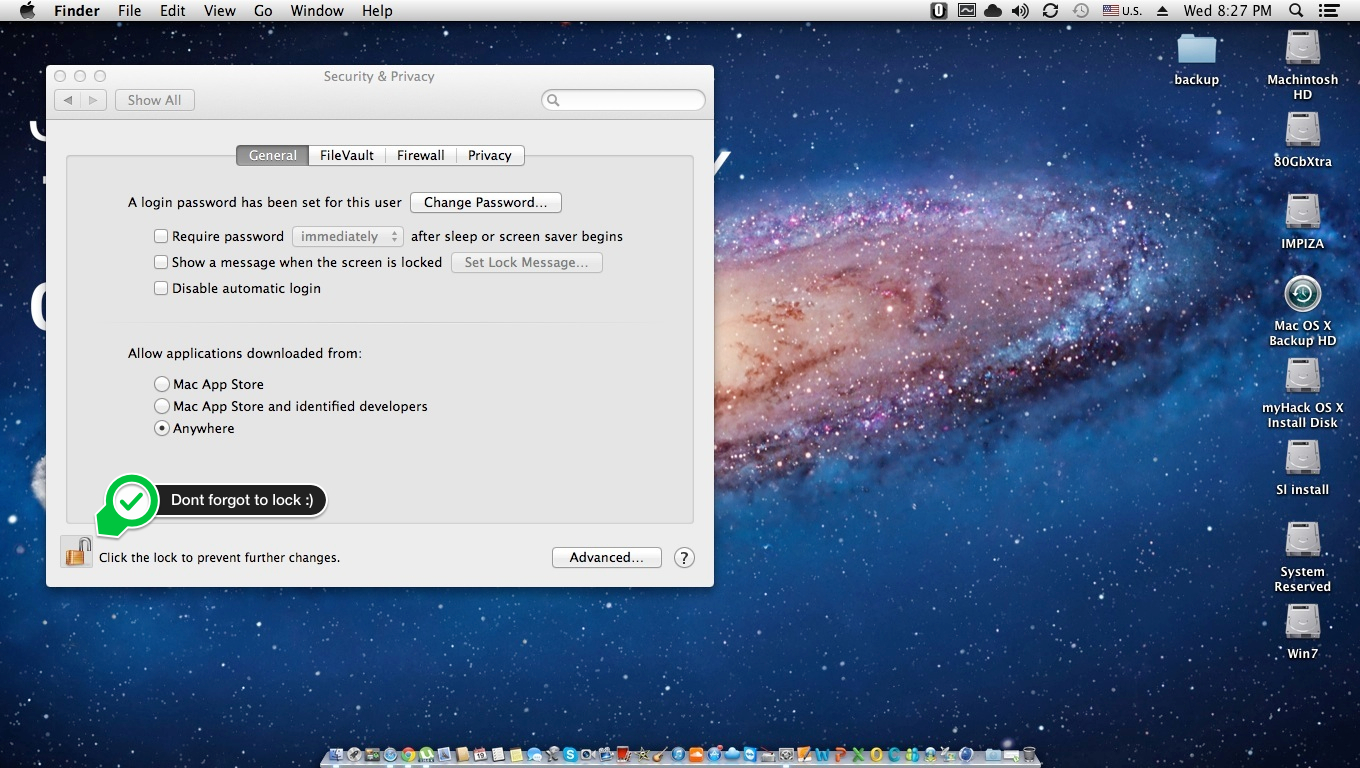
Click lock icon on left corner of Security & Privacy Window
Now it will ask your admin Password to grand access
“System Preferences is trying to unlock security & Privacy preferences. Type your password to allow this “
type your password in the box and click unlock
Now you can see a section called “Allow application download from :”
- Mac App Store
- Mac App Store and identified developers
- Anywhere
by default it will be 2. Mac App Store and identified developers
you have to change it to 3. Anywhere
now a small drop down window will appear for confirmation
click “Allow From Anywhere”
now unlock icon again to lock window
Done 🙂
by George Sruthin | May 7, 2013 | Howtos, Windows
WLAN Card remains off, after upgrading to windows 8 ?
Description !
Wireless Wide Area Network is in off state after upgrading the computer to Windows 8. !
Solution !
Simply load the BIOS defaults and it should take care of the issue. !
Information in this document applies to the following:
Systems:
- HP EliteBook 2170p Notebook PC
- HP EliteBook 2560p Notebook PC
- HP EliteBook 2760p Tablet PC
- HP EliteBook 8460p Notebook PC
- HP EliteBook 8460w Mobile Workstation
- HP EliteBook 8470p Notebook PC
- HP EliteBook 8560p Notebook PC
- HP EliteBook 8560w Mobile Workstation
- HP EliteBook 8570p Notebook PC
- HP EliteBook 8570w Mobile Workstation
- HP EliteBook 8760w Mobile Workstation
- HP EliteBook 8770w Mobile Workstation
- HP EliteBook Folio 9470m Notebook PC
- HP ProBook 2570p Notebook PC
- HP ProBook 6460b Notebook PC
- HP ProBook 6470b Notebook PC
- HP ProBook 6560b Notebook PC
- HP ProBook 6570b Notebook PC
Resolution
Follow the steps provided to resolve this issue.
- Start the computer.
- Press the F10 key to enter the BIOS setup
- Select Restore Defaults
- Under Load Defaults , Select Yes .
- Choose Save Changes and Exit .
- Under Save Changes and Exit , Choose Yes .
by George Sruthin | Mar 27, 2013 | Howtos, Windows
Bored with Windows 8 Metro style start menu ?
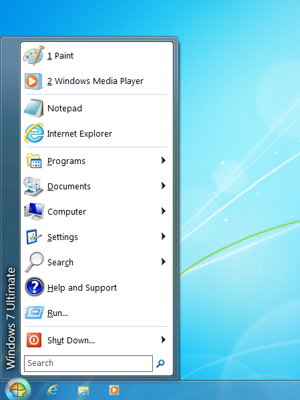
want to add Windows xp , 7 like Start menu in Win 8
install classic shell to get your START button Back on Windows 8 OS
download and install latest files then
after installing go to start button, right click .. select “settings” on the pop-up form, select “all settings”
done !
different styles
Windows classic style
Windows XP style
Windows 7 Style
This website also provide Windows 7 Classic explorer styles
System Requirements
Classic Shell works on Windows Vista , Windows 7 , Windows 8 , Windows Server 2008, Windows Server 2008 R2 , and Windows Server 2012 , Both 32 and 64 Bit Versions are supported (the same installer works for both)
enjoy 🙂